Templates · Detail screens · Lifestyle app · Vow
Vow Seating screen
A detail screen from Vow, a wedding planner app template in a Luxury style. Screen 15 of 25.
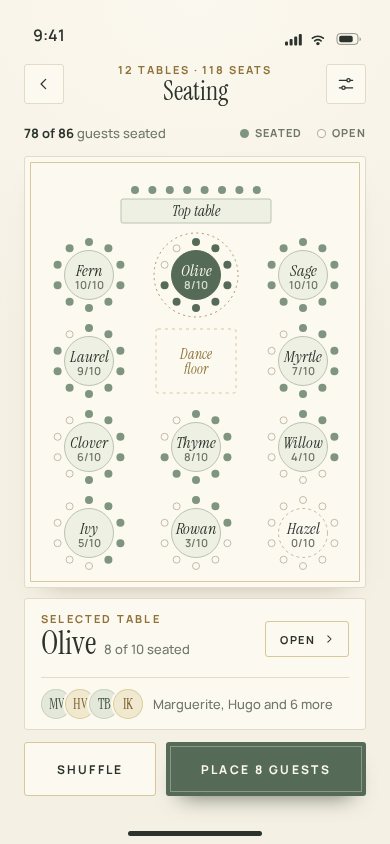
Vow is a complete wedding planner: welcome, sign in, setting up the day, a home with the countdown inside a botanical wreath, a checklist by month, a budget with a category breakdown, the guest list, one guest, RSVPs with meal counts, a seating chart drawn as round tables named after plants, vendors, booking a visit, the day's timeline, the registry, a paid tier, profile and settings. Everything is typeset like fine stationery in ivory, sage and gold.
| Detail | Value |
|---|---|
| Screen type | Detail |
| App | Vow: Wedding planner |
| Category | Lifestyle |
| Design language | Luxury, light |
| Type | Manrope |
| Colours | #f5f0e4 background, #fcf9f1 surface, #2b332c text, #6f766a text-muted, #556b57 accent, #fcf9f1 accent-contrast, #b39558 secondary, #e3dbc8 border, #a8573f danger |
What this screen says
- 12 tables · 118 seats
- Seating
- 78 of 86 guests seated
- SeatedOpen
- Selected table
- Olive8 of 10 seated
- Open
- MVHVTBIK
- Marguerite, Hugo and 6 more
- Shuffle
- Place 8 guests
Around it in Vow
More detail screens
- Mane Face shape: AI hairstyle try-on
- Annex Result: AI interior redesign
- Kino Title: Film and series streaming
- Waybill Parcel: Every parcel, read like its label
- Torque Vehicle: The workshop manual for your own car
- Vetly Pet: Pet health record
- Stitch Project: A knitting companion drawn as one big knitting chart
- Roost Chore: Your shared house, stuck to the fridge door
- Trellis Bed: Vegetable garden planner
- Grain Photo: Camera and photo editor
- Posy Bouquet: Flower delivery and weekly stems
- Fern Plant: Plant care
Every lifestyle app detail screen
What makes a good detail screen
- Lead with what identifies the item. A large image or title, the price or status, and the key facts at the top. People should know they are in the right place at a glance.
- Keep the main action visible. A sticky bottom button for Add to cart, Book or Play stays reachable while people scroll through details.
- Order information by importance. The facts that decide the choice come first; reviews, specifications and fine print further down.
- Use progressive disclosure. Long descriptions, specifications and policies can expand on tap rather than filling the screen.
The full detail screen guide and every example
Remix Vow free: describe your own app and it is drawn in this design. Or get its files from $10: Figma, React Native, SwiftUI, Flutter and HTML.