Templates · Detail screens · Lifestyle app · Vetly
Vetly Pet screen
A detail screen from Vetly, a pet health record app template in a Neubrutalism style. Screen 7 of 25.
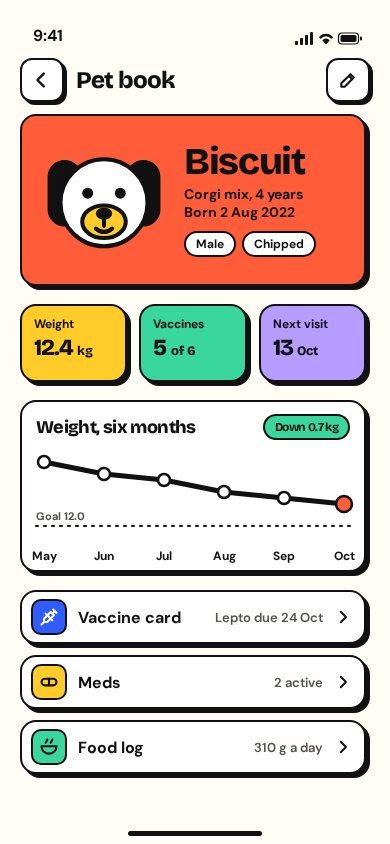
Vetly is a complete pet health app: welcome, sign in, adding a pet, a home with the next visit and today's meds, a book for each pet, a stamped vaccination card, vet visits as notched tickets with booking, medication reminders, a weight chart and log, a food log, nearby vets, a Plus plan, notifications, profile and settings. Every pet, stamp and pictogram is drawn.
| Detail | Value |
|---|---|
| Screen type | Detail |
| App | Vetly: Pet health record |
| Category | Lifestyle |
| Design language | Neubrutalism, light |
| Type | DM Sans |
| Colours | #fffdf5 background, #ffffff surface, #111111 text, #55524b text-muted, #ff5c39 accent, #111111 accent-contrast, #2f5bff secondary, #111111 border, #d63a1a danger |
What this screen says
- Pet book
- Biscuit
- Corgi mix, 4 years
- Born 2 Aug 2022
- Male Chipped
- Weight12.4 kg
- Vaccines5 of 6
- Next visit13 Oct
- Weight, six monthsDown 0.7 kg
- Vaccine card
- Lepto due 24 Oct
- Meds
- 2 active
- Food log
- 310 g a day
Around it in Vetly
More detail screens
- Trove Idea: Visual ideas and boards
- Vidi Playlist: Video platform for creators
- Roll Photo info: Photo library and backups
- Splice Template: Video editor for short clips
- Blush Product: Beauty and makeup shopping
- Flatpack Product: Furniture store with room previews
- Column Publication: Newsletters and independent writers
- Fetch Sitter: Dog walkers and pet sitters
- Forecourt Listing: Buy and sell used cars
- Tower My plan: Mobile plan, data and bills
- Haul Product: Bargain fashion and finds
- Muse Upscale: AI image studio
Every lifestyle app detail screen
What makes a good detail screen
- Lead with what identifies the item. A large image or title, the price or status, and the key facts at the top. People should know they are in the right place at a glance.
- Keep the main action visible. A sticky bottom button for Add to cart, Book or Play stays reachable while people scroll through details.
- Order information by importance. The facts that decide the choice come first; reviews, specifications and fine print further down.
- Use progressive disclosure. Long descriptions, specifications and policies can expand on tap rather than filling the screen.
The full detail screen guide and every example
Remix Vetly free: describe your own app and it is drawn in this design. Or get its files from $10: Figma, React Native, SwiftUI, Flutter and HTML.