Templates · Success and confirmation screens · Travel app · Volta
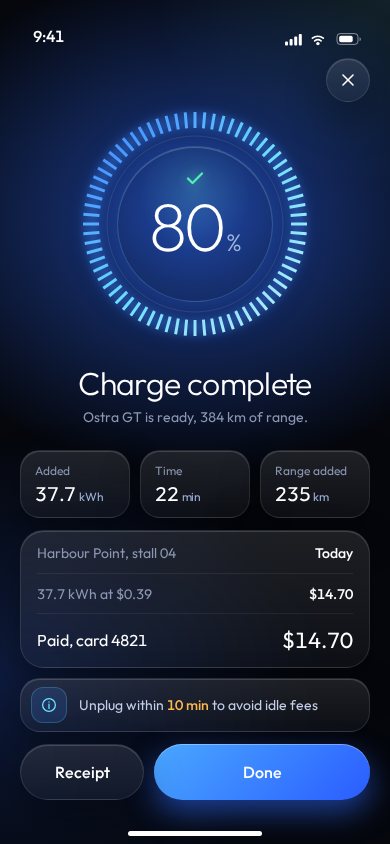
Volta Charge complete screen
A success screen from Volta, an EV charging app template in a Glass style. Screen 14 of 25.
Volta is a complete EV charging app: welcome, sign in, a code and adding your car, a home with the live charge, a charger map with filters, nearby stations, a station with its stalls, picking a connector, plugging in, a live session, the finished charge and its receipt, a trip planner with charging stops, car status, a home charging schedule, energy stats, history, wallet, a Plus plan, notifications, profile and settings. One electric blue for everything that carries current.
| Detail | Value |
|---|---|
| Screen type | Success |
| App | Volta: EV charging |
| Category | Travel |
| Design language | Glass, dark |
| Type | Outfit |
| Colours | #05070d background, #111624 surface, #ffffff text, #8b97b3 text-muted, #3d8bff accent, #ffffff accent-contrast, #6fe3ff secondary, #232a3c border, #ff5f6e danger |
What this screen says
- Charge complete
- Ostra GT is ready, 384 km of range.
- Added
- 37.7kWh
- Time
- 22min
- Range added
- 235km
- Harbour Point, stall 04Today
- 37.7 kWh at $0.39$14.70
- Paid, card 4821$14.70
- Unplug within 10 min to avoid idle fees
- Receipt
- Done
Around it in Volta
More success and confirmation screens
- Convoy Booked: Carpooling between cities
- Manifest Rebooked: Trip plans from your confirmation emails
- Roadster Booked: Your electric car, from your phone
- Fairground Return time: Theme park tickets, wait times and map
- Scoot Unlocked: E-scooter and e-bike rental
- Nomad Purchase complete: Travel eSIM data plans
- Tern Booked: Ferry and island hopping
- Berth Booked: Night trains and sleeper cabins
- Caravan Booked: Campervan rental and road trips
- Layover Lounge booked: Airport guide, gates and lounges
- Permit Submitted: Visas and travel documents wallet
- Backroad Booked: Road trip planner with stops
Every travel app success screen
What makes a good confirmation screen
- Confirm in the headline. "Payment sent", "Table booked for Friday at 8" or "Lesson complete" in plain words, with a clear success colour or icon.
- Repeat the key details. Amount, date, reference number or score, so people do not need to check elsewhere that the right thing happened.
- Say what happens next. When the order arrives, when the money lands, when the next lesson unlocks.
- Offer the next step. Track the order, add to calendar, share, or start the next lesson. One primary action and a way back home.
The full confirmation screen guide and every example
Remix Volta free: describe your own app and it is drawn in this design. Or get its files from $10: Figma, React Native, SwiftUI, Flutter and HTML.