Templates · Success and confirmation screens · Travel app · Caravan
Caravan Booked screen
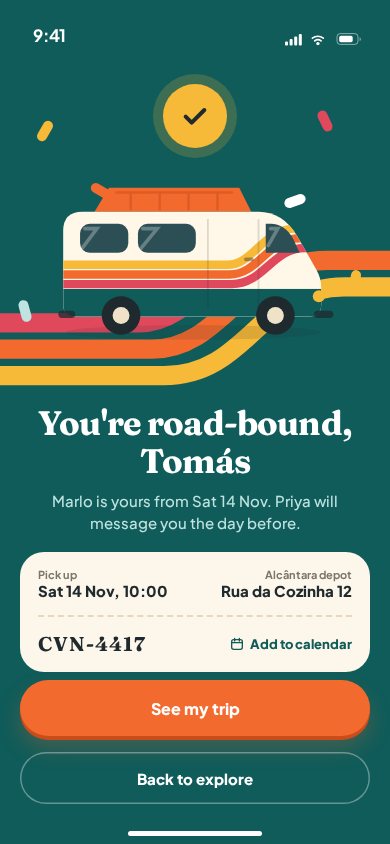
A success screen from Caravan, a campervan rental and road trips app template in a Playful style. Screen 11 of 25.
Caravan is a complete campervan rental and road trip app: welcome and sign in, an explore home, van search with results, a van page with a drawn floor plan, dates, extras, checkout and a booked screen, trips and a trip hub, pickup check-in, a route planner, live driving on a drawn coastal map, overnight spots and a spot page, a video van guide, a road journal, a postcard maker, notifications, a Club plan, profile and settings. Sun cream and teal with 70s livery stripes in mustard, tangerine and cherry.
| Detail | Value |
|---|---|
| Screen type | Success |
| App | Caravan: Campervan rental and road trips |
| Category | Travel |
| Design language | Playful, light |
| Type | Fraunces for headings, Plus Jakarta Sans for text |
| Colours | #fdf6ea background, #ffffff surface, #1f2a2e text, #7b766b text-muted, #f26a2e accent, #ffffff accent-contrast, #0f5c5a secondary, #efe2cb border, #e0485c danger |
What this screen says
- You're road-bound, Tomás
- Marlo is yours from Sat 14 Nov. Priya will message you the day before.
- Pick upSat 14 Nov, 10:00
- Alcântara depotRua da Cozinha 12
- CVN-4417 Add to calendar
- See my trip
- Back to explore
Around it in Caravan
More success and confirmation screens
- Detour Reported: Community driving navigation
- Convoy Booked: Carpooling between cities
- Manifest Rebooked: Trip plans from your confirmation emails
- Roadster Booked: Your electric car, from your phone
- Fairground Return time: Theme park tickets, wait times and map
- Scoot Unlocked: E-scooter and e-bike rental
- Nomad Purchase complete: Travel eSIM data plans
- Tern Booked: Ferry and island hopping
- Berth Booked: Night trains and sleeper cabins
- Layover Lounge booked: Airport guide, gates and lounges
- Permit Submitted: Visas and travel documents wallet
- Backroad Booked: Road trip planner with stops
Every travel app success screen
What makes a good confirmation screen
- Confirm in the headline. "Payment sent", "Table booked for Friday at 8" or "Lesson complete" in plain words, with a clear success colour or icon.
- Repeat the key details. Amount, date, reference number or score, so people do not need to check elsewhere that the right thing happened.
- Say what happens next. When the order arrives, when the money lands, when the next lesson unlocks.
- Offer the next step. Track the order, add to calendar, share, or start the next lesson. One primary action and a way back home.
The full confirmation screen guide and every example
Remix Caravan free: describe your own app and it is drawn in this design. Or get its files from $10: Figma, React Native, SwiftUI, Flutter and HTML.