Templates · Success and confirmation screens · Travel app · Manifest
Manifest Rebooked screen
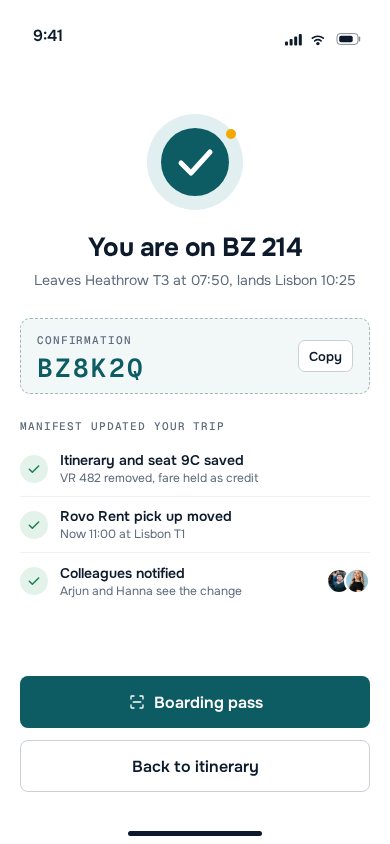
A success screen from Manifest, a travel app template in an Enterprise style. Screen 12 of 25.
Manifest is a complete trip organiser for people who travel for work: welcome, how forwarding works, sign in, a home with the next flight and live status, trips, a master itinerary timeline, flight details, the inbound aircraft on a live map, a gate change alert, alternate flights with a rebook and confirmation, a boarding pass, hotel and rental car details, a parsed email inbox, a manual plan form, documents, sharing with colleagues, an expense export, travel stats, alerts, a Pro plan, profile and settings. Cool grey and white with deep petrol and signal amber.
| Detail | Value |
|---|---|
| Screen type | Success |
| App | Manifest: Trip plans from your confirmation emails |
| Category | Travel |
| Design language | Enterprise, light |
| Type | Onest |
| Colours | #f3f4f6 background, #ffffff surface, #0c1a2b text, #5d6b7c text-muted, #0d5c63 accent, #ffffff accent-contrast, #f2a900 secondary, #dfe3e8 border, #c23a30 danger |
What this screen says
- You are on BZ 214
- Leaves Heathrow T3 at 07:50, lands Lisbon 10:25
- Confirmation BZ8K2Q
- Copy
- Manifest updated your trip
- Itinerary and seat 9C saved
- VR 482 removed, fare held as credit
- Rovo Rent pick up moved
- Now 11:00 at Lisbon T1
- Colleagues notified
- Arjun and Hanna see the change
- Boarding pass
- Back to itinerary
Around it in Manifest
More success and confirmation screens
- Aloft Lounge pass: Flight tracker
- Pitch Booked: Campsite booking and trip kit
- Hail Arrived: Ride hailing
- Volta Charge complete: EV charging
- Museo Booked: Museum guide
- Roamly Booked: Trips, stays and experiences
- Jaunt Booked: Bus, train and flight booking
- Spoke Unlocked: Bike sharing
- Navara Confirmed: Yacht charter
- Voya Ticket: Travel booking
- Wheelhouse Trip complete: Driver app for ride hailing
- Fuelup Receipt: Pay at the pump and car wash
Every travel app success screen
What makes a good confirmation screen
- Confirm in the headline. "Payment sent", "Table booked for Friday at 8" or "Lesson complete" in plain words, with a clear success colour or icon.
- Repeat the key details. Amount, date, reference number or score, so people do not need to check elsewhere that the right thing happened.
- Say what happens next. When the order arrives, when the money lands, when the next lesson unlocks.
- Offer the next step. Track the order, add to calendar, share, or start the next lesson. One primary action and a way back home.
The full confirmation screen guide and every example
Remix Manifest free: describe your own app and it is drawn in this design. Or get its files from $10: Figma, React Native, SwiftUI, Flutter and HTML.