Templates · Success and confirmation screens · Travel app · Layover
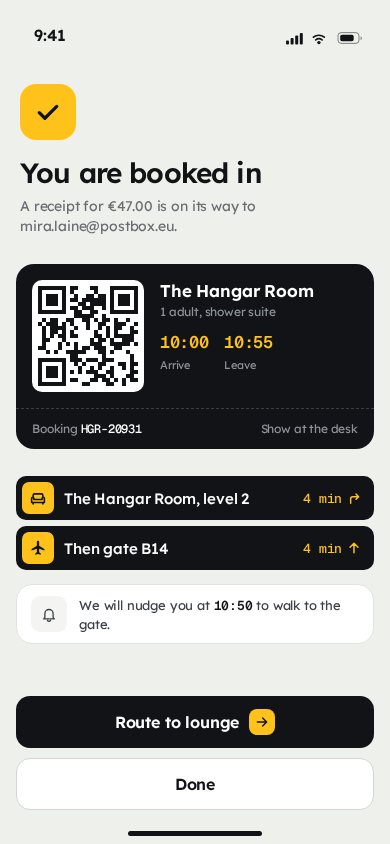
Layover Lounge booked screen
A success screen from Layover, a travel app template in an Enterprise style. Screen 16 of 25.
Layover is a complete airport companion: welcome, sign in, add a flight, a home with the next flight, a boarding countdown and live wayfinding signs, flight details, a boarding pass, a split flap departures board, a terminal map with a walking route, security wait times, a tight connection guide, explore and search, lounges with booking and a lounge pass, a coffee bar with order ahead and live pickup status, airport services, a year of trips in charts, alerts, a paid plan, profile and settings. Concrete grey and white with ink and signal yellow.
| Detail | Value |
|---|---|
| Screen type | Success |
| App | Layover: Airport guide, gates and lounges |
| Category | Travel |
| Design language | Enterprise, light |
| Type | Geist Mono for headings, Lexend for text |
| Colours | #eef0eb background, #ffffff surface, #111316 text, #686e74 text-muted, #ffc21a accent, #111316 accent-contrast, #12845a secondary, #dfe2dc border, #d63c3c danger |
What this screen says
- You are booked in
- A receipt for €47.00 is on its way to mira.laine@postbox.eu.
- The Hangar Room
- 1 adult, shower suite
- 10:00Arrive
- 10:55Leave
- Booking HGR-20931 Show at the desk
- The Hangar Room, level 24 min
- Then gate B144 min
- We will nudge you at 10:50 to walk to the gate.
- Route to lounge
- Done
Around it in Layover
More success and confirmation screens
- Hail Arrived: Ride hailing
- Volta Charge complete: EV charging
- Museo Booked: Museum guide
- Roamly Booked: Trips, stays and experiences
- Jaunt Booked: Bus, train and flight booking
- Spoke Unlocked: Bike sharing
- Navara Confirmed: Yacht charter
- Voya Ticket: Travel booking
- Wheelhouse Trip complete: Driver app for ride hailing
- Fuelup Receipt: Pay at the pump and car wash
- Omnia Delivered: Super app for rides, food and payments
- Staya Booked: Homes and stays from local hosts
Every travel app success screen
What makes a good confirmation screen
- Confirm in the headline. "Payment sent", "Table booked for Friday at 8" or "Lesson complete" in plain words, with a clear success colour or icon.
- Repeat the key details. Amount, date, reference number or score, so people do not need to check elsewhere that the right thing happened.
- Say what happens next. When the order arrives, when the money lands, when the next lesson unlocks.
- Offer the next step. Track the order, add to calendar, share, or start the next lesson. One primary action and a way back home.
The full confirmation screen guide and every example
Remix Layover free: describe your own app and it is drawn in this design. Or get its files from $10: Figma, React Native, SwiftUI, Flutter and HTML.