Templates · Onboarding screens · Lifestyle app · Vidi
Vidi Welcome screen
An onboarding screen from Vidi, a video platform for creators app template in a Minimal style. Screen 1 of 25.
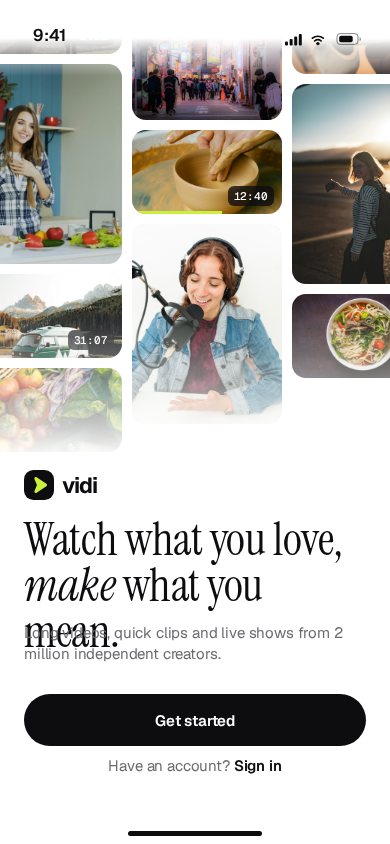
Vidi is a complete video app for watching and making: welcome, topics, sign in, a home feed, the player with chapters and up next, comments, vertical clips, live with chat, search and results, channels, following, library, playlists and downloads, then the creator side: trim an upload, add details, publish, a studio dashboard and per video stats. Channel memberships, a premium plan, notifications, profile and settings. White and warm grey with ink black and one acid lime accent.
| Detail | Value |
|---|---|
| Screen type | Onboarding |
| App | Vidi: Video platform for creators |
| Category | Lifestyle |
| Design language | Minimal, light |
| Type | Instrument Serif for headings, Geist for text |
| Colours | #ffffff background, #f4f4f1 surface, #0d0d0f text, #6b6b70 text-muted, #c8f03c accent, #0d0d0f accent-contrast, #ececea border, #ff4a3d danger |
What this screen says
- vidi
- Watch what you love, make what you mean.
- Long videos, quick clips and live shows from 2 million independent creators.
- Get started
- Have an account? Sign in
Around it in Vidi
More onboarding screens
- Postage Welcome: Send parcels and find drop-off points
- Specs Welcome: Glasses with virtual try-on
- Circuit Welcome: Electronics store with trade-in and repairs
- Provenance Welcome: Authenticated luxury resale
- Gavel Welcome: Live online auctions
- Tidy Welcome: Book home cleaners
- Dorm Welcome: Find student housing
- Hem Welcome: Tailoring and alterations, collected
- Lendly Welcome: Borrow things from neighbours
- Stub Welcome: Fan to fan ticket resale
- Trove Welcome: Visual ideas and boards
- Roll Welcome: Photo library and backups
Every lifestyle app onboarding screen
What makes a good onboarding screen
- One idea per screen. Each screen should say one thing in a headline people can read in a second. If a screen needs a paragraph, it is doing too much.
- Personalise with a purpose. Ask a question only if the answer changes what people see next, like a goal, a level or an interest. Then show that the answer mattered.
- Explain permissions before asking. Show your own screen saying why you need notifications, location or the camera before the system prompt. People who understand the reason are more likely to allow it.
- Let people skip. A visible skip or "I'll do this later" respects returning users and the impatient. Make sure skipping still lands them somewhere useful.
The full onboarding screen guide and every example
Remix Vidi free: describe your own app and it is drawn in this design. Or get its files from $10: Figma, React Native, SwiftUI, Flutter and HTML.