Templates · Onboarding screens · Lifestyle app · Gavel
Gavel Welcome screen
An onboarding screen from Gavel, a live online auctions app template in a Brutalist style. Screen 1 of 25.
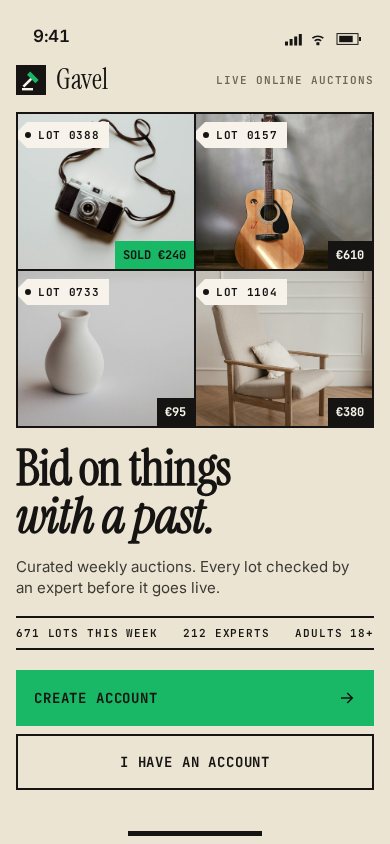
Gavel is a complete online auction house: welcome, interests and sign in, a home with tonight's closing lot, the week's curated auctions, an auction's lots, search, a lot page with the expert estimate, a condition report and bid history, live bidding with an outbid alert, a max bid keypad and a bid placed screen, watchlist and my bids, a won lot checkout with buyer protection, payment confirmed and shipment tracking, selling a lot with expert review, seller payouts, notifications, a membership plan, profile and settings. Manila paper, black ink and a bid green.
| Detail | Value |
|---|---|
| Screen type | Onboarding |
| App | Gavel: Live online auctions |
| Category | Lifestyle |
| Design language | Brutalist, light |
| Type | Instrument Serif for headings, Inter for text |
| Colours | #ebe4d3 background, #f7f3ea surface, #151412 text, #6e6757 text-muted, #19b866 accent, #151412 accent-contrast, #151412 secondary, #cfc6b1 border, #e5361b danger |
What this screen says
- GavelLive online auctions
- LOT 0388 SOLD €240
- LOT 0157 €610
- LOT 0733 €95
- LOT 1104 €380
- Bid on things
- with a past.
- Curated weekly auctions. Every lot checked by an expert before it goes live.
- 671 lots this week 212 experts Adults 18+
- Create account
- I have an account
Around it in Gavel
More onboarding screens
- Blush Welcome: Beauty and makeup shopping
- Flatpack Welcome: Furniture store with room previews
- Column Welcome: Newsletters and independent writers
- Fetch Welcome: Dog walkers and pet sitters
- Forecourt Welcome: Buy and sell used cars
- Tower Welcome: Mobile plan, data and bills
- Haul Welcome: Bargain fashion and finds
- Muse Welcome: AI image studio
- Admit Welcome: Events and tickets near you
- Arcade Welcome: Game store, library and friends
- Natal Welcome: Birth charts and daily astrology
- Sillage Welcome: Fragrance wardrobe
Every lifestyle app onboarding screen
What makes a good onboarding screen
- One idea per screen. Each screen should say one thing in a headline people can read in a second. If a screen needs a paragraph, it is doing too much.
- Personalise with a purpose. Ask a question only if the answer changes what people see next, like a goal, a level or an interest. Then show that the answer mattered.
- Explain permissions before asking. Show your own screen saying why you need notifications, location or the camera before the system prompt. People who understand the reason are more likely to allow it.
- Let people skip. A visible skip or "I'll do this later" respects returning users and the impatient. Make sure skipping still lands them somewhere useful.
The full onboarding screen guide and every example
Remix Gavel free: describe your own app and it is drawn in this design. Or get its files from $10: Figma, React Native, SwiftUI, Flutter and HTML.