Templates · Onboarding screens · Lifestyle app · Hem
Hem Welcome screen
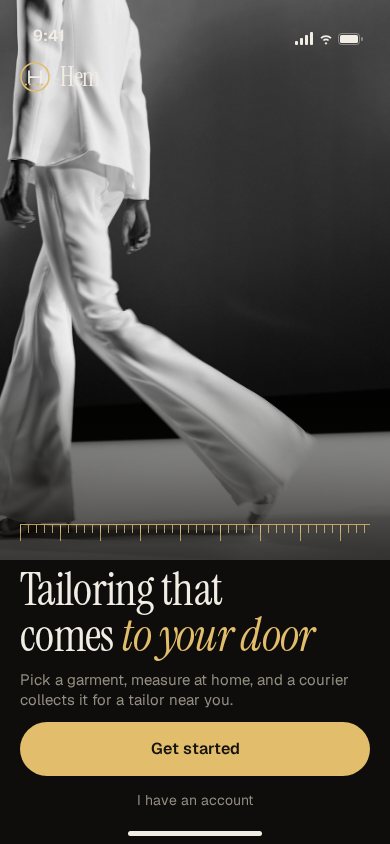
An onboarding screen from Hem, a lifestyle app template in a Minimal style. Screen 1 of 25.
Hem is a complete tailoring and alterations app: welcome and how it works, sign in, a home with the order at the bench and nearby tailors, choosing a garment and the work, a drawn hem length diagram, guided self measuring on a body diagram, a fit photo camera, a price quote, a tailor page, a collection slot picker, review and booking, live courier tracking on a map, tailor progress with notes and photos, a fitting appointment, delivery back with a handover code, orders, saved measurements with a waist trend, garment history, a Plus plan, notifications, profile and settings. Warm black and charcoal with chalk gold and bone white.
| Detail | Value |
|---|---|
| Screen type | Onboarding |
| App | Hem: Tailoring and alterations, collected |
| Category | Lifestyle |
| Design language | Minimal, dark |
| Type | Instrument Serif for headings, Geist for text |
| Colours | #0e0d0b background, #191814 surface, #f2ede4 text, #948d81 text-muted, #e2bd6b accent, #17140e accent-contrast, #22201b secondary, #2c2a24 border, #d9665a danger |
What this screen says
- Hem
- Tailoring that
- comes to your door
- Pick a garment, measure at home, and a courier collects it for a tailor near you.
- Get started
- I have an account
Around it in Hem
More onboarding screens
- Vidi Welcome: Video platform for creators
- Roll Welcome: Photo library and backups
- Splice Welcome: Video editor for short clips
- Blush Welcome: Beauty and makeup shopping
- Flatpack Welcome: Furniture store with room previews
- Column Welcome: Newsletters and independent writers
- Fetch Welcome: Dog walkers and pet sitters
- Forecourt Welcome: Buy and sell used cars
- Tower Welcome: Mobile plan, data and bills
- Haul Welcome: Bargain fashion and finds
- Muse Welcome: AI image studio
- Admit Welcome: Events and tickets near you
Every lifestyle app onboarding screen
What makes a good onboarding screen
- One idea per screen. Each screen should say one thing in a headline people can read in a second. If a screen needs a paragraph, it is doing too much.
- Personalise with a purpose. Ask a question only if the answer changes what people see next, like a goal, a level or an interest. Then show that the answer mattered.
- Explain permissions before asking. Show your own screen saying why you need notifications, location or the camera before the system prompt. People who understand the reason are more likely to allow it.
- Let people skip. A visible skip or "I'll do this later" respects returning users and the impatient. Make sure skipping still lands them somewhere useful.
The full onboarding screen guide and every example
Remix Hem free: describe your own app and it is drawn in this design. Or get its files from $10: Figma, React Native, SwiftUI, Flutter and HTML.