Templates · Profile screens · Productivity app · Unplug
Unplug Profile screen
A profile screen from Unplug, a screen time blocker app template in a Glass style. Screen 24 of 25.
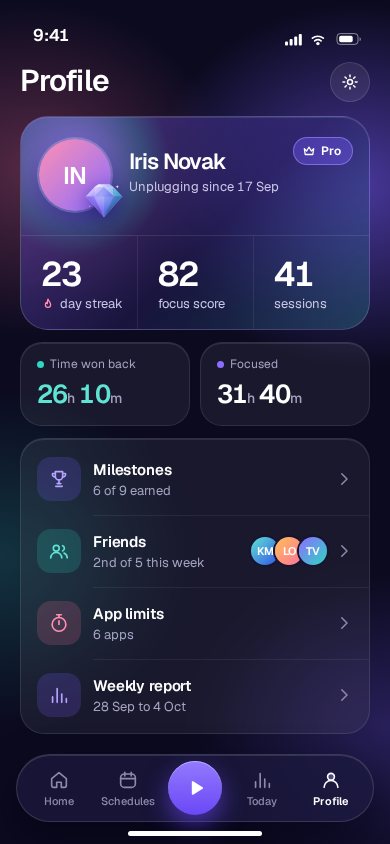
Unplug is a complete screen time app: an onboarding that projects your year on the phone, screen time access, choosing apps to block, a paywall, a home with the focus score, today's screen time by hour and the live session, a ring timer, the calm blocked screen, breaks, schedules, app limits, daily and weekly reports, insights, streaks, milestones and friends. Midnight indigo with aurora glows, frosted glass and a faceted gem that changes colour as the score climbs.
| Detail | Value |
|---|---|
| Screen type | Profile |
| App | Unplug: Screen time blocker |
| Category | Productivity |
| Design language | Glass, dark |
| Type | Geist |
| Colours | #0b0a1f background, #1a1836 surface, #ffffff text, #a5a3c2 text-muted, #7a5cff accent, #ffffff accent-contrast, #2fd6c3 secondary, #2b2850 border, #ff6f9c danger |
What this screen says
- Profile
- IN
- Iris Novak
- Unplugging since 17 Sep
- Pro
- 23 day streak
- 82focus score
- 41sessions
- Time won back
- 26h10m
- Focused
- 31h40m
- Milestones
- 6 of 9 earned
- Friends
- 2nd of 5 this week
- KM LO TV
- App limits
- 6 apps
- Weekly report
- 28 Sep to 4 Oct
- Home
- Schedules
- Today
Around it in Unplug
More profile screens
- Outpost Channel: Schedule social posts
- Pageview Account: Website analytics
- Polish Profile: Writing assistant and keyboard
- Tapline Profile: Link-in-bio pages and analytics
- Quill Account: Docs, wikis and databases in one workspace
- Tandem Profile: Team chat, channels and huddles
- Shipyard Profile: Issue tracking for product teams
- Canvas Profile: Design files and comments on mobile
- Merge Profile: Code, pull requests and reviews
- Query Profile: AI answers with sources
- Glossa Profile: Translate text, voice and camera
- Layout Profile: Design anything from templates
Every productivity app profile screen
What makes a good profile screen
- Lead with identity. Photo, name and one line about the person at the top. It confirms whose profile this is.
- Show meaningful stats. Two to four numbers that matter in this app, like workouts, followers, books read or streak.
- Make editing obvious for the owner. An Edit profile button near the top, shown only on your own profile.
- Organise content with tabs. Posts, activity, saved or achievements as tabs keep a long profile tidy.
The full profile screen guide and every example
Remix Unplug free: describe your own app and it is drawn in this design. Or get its files from $10: Figma, React Native, SwiftUI, Flutter and HTML.