Templates · Profile screens · Productivity app · Tandem
Tandem Profile screen
A profile screen from Tandem, a productivity app template in an Enterprise style. Screen 24 of 25.
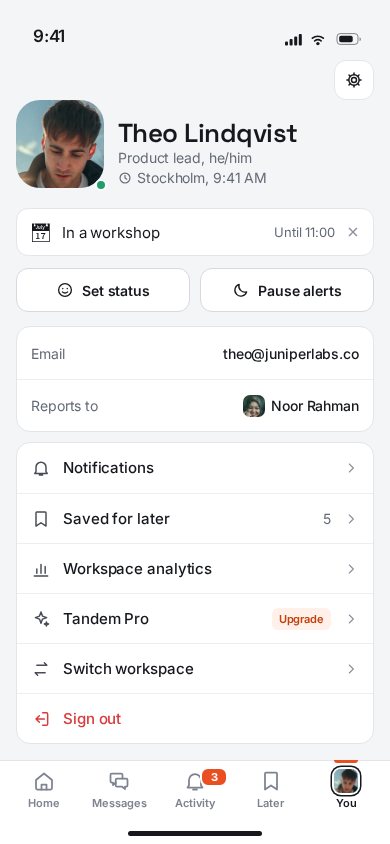
Tandem is a complete team chat app: welcome, sign in with an emailed code, a workspace picker, a home with unread channels, a live huddle and direct messages, a channel with reactions and threads, a thread, a composer with mentions and formatting, direct messages, a live huddle with a shared screen, activity, search, browsing and creating channels, channel details, files, saved for later, setting a status, workspace analytics, a Pro plan with a seat based checkout, profile and notification settings. Cool grey and white with ink and persimmon.
| Detail | Value |
|---|---|
| Screen type | Profile |
| App | Tandem: Team chat, channels and huddles |
| Category | Productivity |
| Design language | Enterprise, light |
| Type | Space Grotesk for headings, Inter for text |
| Colours | #f4f5f7 background, #ffffff surface, #16181d text, #646a76 text-muted, #ea4f22 accent, #ffffff accent-contrast, #16181d secondary, #e3e5ea border, #d93a3a danger, #1f9d6a success |
What this screen says
- Theo Lindqvist
- Product lead, he/him
- Stockholm, 9:41 AM
- 📅 In a workshopUntil 11:00
- Set status
- Pause alerts
- Email theo@juniperlabs.co
- Reports to Noor Rahman
- Notifications
- Saved for later
- Workspace analytics
- Tandem Pro
- Upgrade
- Switch workspace
- Sign out
- Home
- Messages
- Activity 3
- Later
- You
Around it in Tandem
More profile screens
- Tapline Profile: Link-in-bio pages and analytics
- Quill Account: Docs, wikis and databases in one workspace
- Shipyard Profile: Issue tracking for product teams
- Canvas Profile: Design files and comments on mobile
- Merge Profile: Code, pull requests and reviews
- Query Profile: AI answers with sources
- Glossa Profile: Translate text, voice and camera
- Layout Profile: Design anything from templates
- Tick Profile: To-do lists and reminders
- Beacon Me: Find your devices and people
- Staffroom Colleague: HR, payslips and time off
- Slot Account: Booking links and meeting scheduling
Every productivity app profile screen
What makes a good profile screen
- Lead with identity. Photo, name and one line about the person at the top. It confirms whose profile this is.
- Show meaningful stats. Two to four numbers that matter in this app, like workouts, followers, books read or streak.
- Make editing obvious for the owner. An Edit profile button near the top, shown only on your own profile.
- Organise content with tabs. Posts, activity, saved or achievements as tabs keep a long profile tidy.
The full profile screen guide and every example
Remix Tandem free: describe your own app and it is drawn in this design. Or get its files from $10: Figma, React Native, SwiftUI, Flutter and HTML.