Templates · Profile screens · Productivity app · Merge
Merge Profile screen
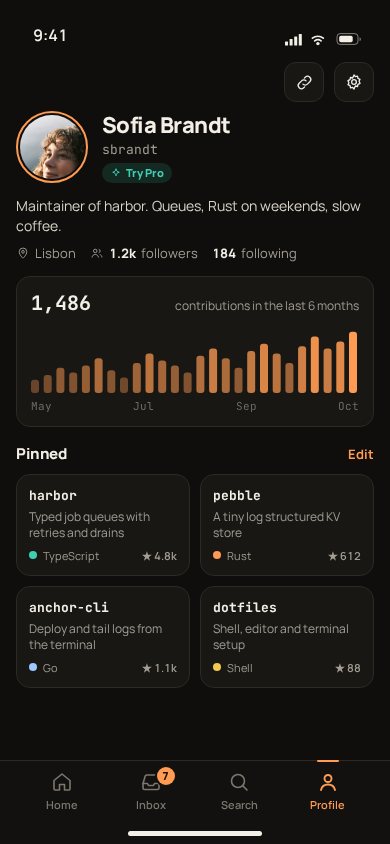
A profile screen from Merge, a productivity app template in a Dark-first style. Screen 24 of 25.
Merge is a complete code review app for your phone: welcome, sign in and two-step verification, a home with your work and reviews waiting, an inbox, search across repositories, pull requests and code, a repository with its files, a code viewer and commits, pull requests with a conversation timeline, a diff with inline comments, submitting a review, live checks with a streaming log, a merge confirmation and the merged state, issues with a detail and a new issue form, repository insights, a release, a Pro plan, profile and settings. Espresso black and charcoal with apricot, teal and rose.
| Detail | Value |
|---|---|
| Screen type | Profile |
| App | Merge: Code, pull requests and reviews |
| Category | Productivity |
| Design language | Dark-first, dark |
| Type | JetBrains Mono for headings, Manrope for text |
| Colours | #0f0e0c background, #181714 surface, #f4efe6 text, #a39d92 text-muted, #ff9b52 accent, #1d1006 accent-contrast, #3fd0b4 secondary, #2c2a25 border, #ff6680 danger |
What this screen says
- Sofia Brandt
- sbrandt
- Try Pro
- Maintainer of harbor. Queues, Rust on weekends, slow coffee.
- Lisbon 1.2k followers 184 following
- 1,486contributions in the last 6 months
- May Jul Sep Oct
- Pinned
- Edit
- harbor
- Typed job queues with retries and drains TypeScript★ 4.8k
- pebble
- A tiny log structured KV store Rust★ 612
- anchor-cli
- Deploy and tail logs from the terminal Go★ 1.1k
- dotfiles
- Shell, editor and terminal setup Shell★ 88
- Home
- Inbox 7
- Search
- Profile
Around it in Merge
More profile screens
- Glance Profile: Visual search with the camera
- Replay Profile: Record and share screen videos
- Easel Profile: Collaborative whiteboard
- Token Profile: Two-factor codes and sign-in approvals
- Beam Profile: Send big files
- Parchment Profile: Documents, edit and share
- Lectern Profile: Slides and presenter remote
- Ringer My card: Phone, contacts and voicemail
- Pipeline Profile: Sales CRM on the road
- Aim Teammate: Goals and key results
- Scribe Profile: Voice memos to notes
- Inkline Profile: Sign and send contracts
Every productivity app profile screen
What makes a good profile screen
- Lead with identity. Photo, name and one line about the person at the top. It confirms whose profile this is.
- Show meaningful stats. Two to four numbers that matter in this app, like workouts, followers, books read or streak.
- Make editing obvious for the owner. An Edit profile button near the top, shown only on your own profile.
- Organise content with tabs. Posts, activity, saved or achievements as tabs keep a long profile tidy.
The full profile screen guide and every example
Remix Merge free: describe your own app and it is drawn in this design. Or get its files from $10: Figma, React Native, SwiftUI, Flutter and HTML.