Templates · Profile screens · Productivity app · Quill
Quill Account screen
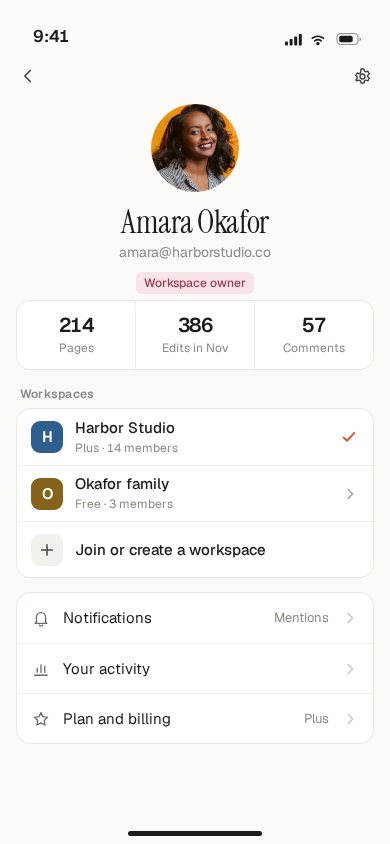
A profile screen from Quill, a productivity app template in a Minimal style. Screen 24 of 25.
Quill is a complete everyday workspace: welcome and sign in with a code, a home with recent pages, events and my tasks, the page tree, a doc with cover, properties, to-dos, a callout and toggles, the slash menu over the keyboard, a verified team wiki, a database as a table, a board and a calendar, a task with properties and comments, a new task form, filters and sorts, search, templates, live meeting notes with a transcript, an assistant that answers from your pages, sharing, the inbox, workspace analytics, plans, checkout and a confirmation, account and settings. Paper white and ink with a vermilion accent.
| Detail | Value |
|---|---|
| Screen type | Profile |
| App | Quill: Docs, wikis and databases in one workspace |
| Category | Productivity |
| Design language | Minimal, light |
| Type | Instrument Serif for headings, Geist for text |
| Colours | #fbfaf7 background, #ffffff surface, #1c1b19 text, #8c8982 text-muted, #e04f2e accent, #ffffff accent-contrast, #f3f1ec secondary, #ebe8e1 border, #b83a1d danger |
What this screen says
- Amara Okafor
- amara@harborstudio.co
- Workspace owner
- 214Pages
- 386Edits in Nov
- 57Comments
- Workspaces
- Harbor StudioPlus · 14 members
- Okafor familyFree · 3 members
- Join or create a workspace
- Notifications Mentions
- Your activity
- Plan and billing Plus
Around it in Quill
More profile screens
- Inkwell Profile: Daily journal
- Shortlist Profile: Job search and application tracker
- Parley Profile: Team messenger
- Docket Teammate: Task and sprint planner
- Kanso Profile: Tasks, calendar and chat
- Margin Profile: AI note taking
- Aide Profile: Executive AI assistant
- Juno Profile: AI chat assistant
- Opal Profile: Studio dashboard
- Jot Profile: Quick notes and checklists
- Chrono Profile: World clock, timers and stopwatch
- Frontdesk Customer: Customer support inbox
Every productivity app profile screen
What makes a good profile screen
- Lead with identity. Photo, name and one line about the person at the top. It confirms whose profile this is.
- Show meaningful stats. Two to four numbers that matter in this app, like workouts, followers, books read or streak.
- Make editing obvious for the owner. An Edit profile button near the top, shown only on your own profile.
- Organise content with tabs. Posts, activity, saved or achievements as tabs keep a long profile tidy.
The full profile screen guide and every example
Remix Quill free: describe your own app and it is drawn in this design. Or get its files from $10: Figma, React Native, SwiftUI, Flutter and HTML.