Templates · Home screens · Lifestyle app · Shelf
Shelf Home screen
A home screen from Shelf, a reading tracker and book club app template in a Minimal style. Screen 5 of 25.
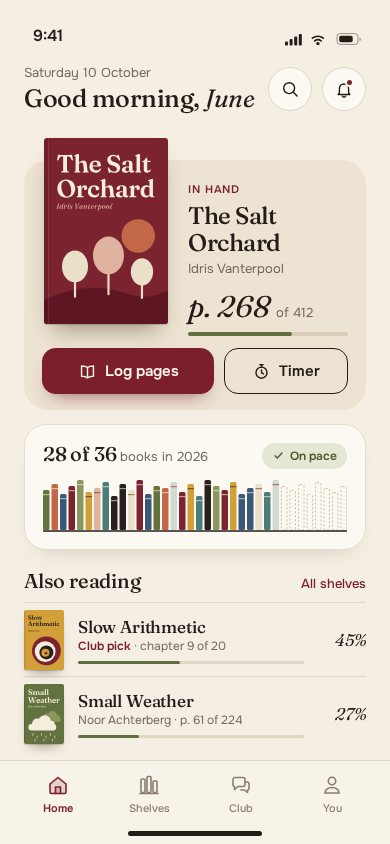
Shelf is a complete reading tracker and book club: onboarding with a yearly goal, a home with the book in hand, book pages, logging pages, a reading timer, finishing and reviewing, shelves drawn as rows of spines, search, a reading goal, the year in books, saved quotes, a club with discussion by chapter, voting on the next pick, meetings, a plan, profile and settings. Warm paper with oxblood, moss and Fraunces.
| Detail | Value |
|---|---|
| Screen type | Home |
| App | Shelf: Reading tracker and book club |
| Category | Lifestyle |
| Design language | Minimal, light |
| Type | Onest |
| Colours | #f5efe3 background, #fcf9f2 surface, #231c18 text, #75695d text-muted, #7a1f2b accent, #fcf6ea accent-contrast, #5f6f3e secondary, #e0d6c3 border, #b3402e danger |
What this screen says
- Saturday 10 October
- Good morning, June
- In hand
- The Salt Orchard
- Idris Vanterpool
- p. 268of 412
- Log pages
- Timer
- 28 of 36 books in 2026
- On pace
- Also reading
- All shelves
- Slow Arithmetic
- Club pick · chapter 9 of 20
- Small Weather
- Noor Achterberg · p. 61 of 224
- Home
- Shelves
- Club
- You
Around it in Shelf
More home screens
- Toolbox Home: Hardware store and project lists
- Brief Feed: News in sixty words
- Kibble Home: Pet supplies and autoship
- Filmlog Home: Film diary and reviews
- Guardrail Family: Parental controls and screen time
- Collar Map: GPS pet tracker
- Postage Home: Send parcels and find drop-off points
- Specs Shop: Glasses with virtual try-on
- Circuit Home: Electronics store with trade-in and repairs
- Provenance Shop: Authenticated luxury resale
- Gavel Home: Live online auctions
- Tidy Home: Book home cleaners
Every lifestyle app home screen
What makes a good home screen
- Put the most important thing first. Decide the one thing most people come for, like today's workout, a balance or the next booking, and give it the top of the screen.
- Make it feel current. Greetings with the time of day, today's date, fresh numbers and recent activity tell people the app is alive and about them.
- Keep quick actions within thumb reach. The two or three things people do most should be one tap away, in the lower part of the screen or a floating button.
- Group related content in clear sections. Use headings and spacing so the screen scans as a few blocks, not a long mixed list.
The full home screen guide and every example
Remix Shelf free: describe your own app and it is drawn in this design. Or get its files from $10: Figma, React Native, SwiftUI, Flutter and HTML.