Templates · Home screens · Lifestyle app · Toolbox
Toolbox Home screen
A home screen from Toolbox, a hardware store and project lists app template in an Enterprise style. Screen 4 of 25.
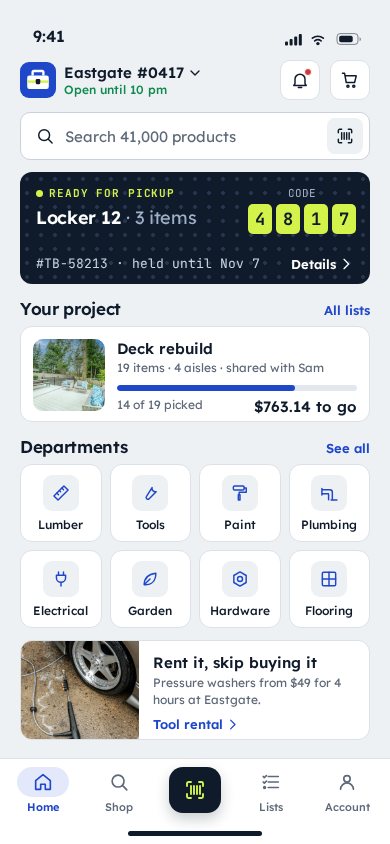
Toolbox is a complete hardware store app: welcome, choosing a home store, sign in, a home with a ready pickup, the active project and departments, search with aisle, bay and stock on every result, a product page with specs and questions, a store floor plan with a walking route, a barcode scanner, project lists sorted by aisle with a decking calculator, a cart split into pickup and delivery, checkout, order placed, orders and a pickup locker, tool rental with a reservation, a Pro plan with job spend, notifications, profile and settings. Cool grey and white with ink, cobalt and a lime signal.
| Detail | Value |
|---|---|
| Screen type | Home |
| App | Toolbox: Hardware store and project lists |
| Category | Lifestyle |
| Design language | Enterprise, light |
| Type | Lexend |
| Colours | #eef1f4 background, #ffffff surface, #0f1a2a text, #5d6878 text-muted, #1f47c9 accent, #ffffff accent-contrast, #d4f34a secondary, #dce1e8 border, #cf3a3a danger |
What this screen says
- Eastgate #0417 Open until 10 pm
- Search 41,000 products
- READY FOR PICKUP
- Locker 12 · 3 items
- CODE4817
- #TB-58213 · held until Nov 7 Details
- Your project
- All lists
- Deck rebuild
- 19 items · 4 aisles · shared with Sam
- 14 of 19 picked $763.14 to go
- Departments
- See all
- Lumber
- Tools
- Paint
- Plumbing
- Electrical
- Garden
- Hardware
- Flooring
- Rent it, skip buying it
- Pressure washers from $49 for 4 hours at Eastgate.
- Tool rental
- Home
- Shop
- Lists
- Account
Around it in Toolbox
More home screens
- Rewear Home: Secondhand fashion marketplace
- Laced Home: Sneaker drops and raffles
- Gloss Home: Salon and spa booking
- Vow Home: Wedding planner
- Drizzle Home: Weather with living skies
- Byline Today: Daily news reader
- Shelf Home: Reading tracker and book club
- Marquee Home: Cinema tickets and watchlist
- Handy Home: Home services
- Tasker Home: Book and do local odd jobs
- Brief Feed: News in sixty words
- Kibble Home: Pet supplies and autoship
Every lifestyle app home screen
What makes a good home screen
- Put the most important thing first. Decide the one thing most people come for, like today's workout, a balance or the next booking, and give it the top of the screen.
- Make it feel current. Greetings with the time of day, today's date, fresh numbers and recent activity tell people the app is alive and about them.
- Keep quick actions within thumb reach. The two or three things people do most should be one tap away, in the lower part of the screen or a floating button.
- Group related content in clear sections. Use headings and spacing so the screen scans as a few blocks, not a long mixed list.
The full home screen guide and every example
Remix Toolbox free: describe your own app and it is drawn in this design. Or get its files from $10: Figma, React Native, SwiftUI, Flutter and HTML.