Templates · Home screens · Lifestyle app · Guardrail
Guardrail Family screen
A home screen from Guardrail, a parental controls and screen time app template in a Minimal style. Screen 5 of 25.
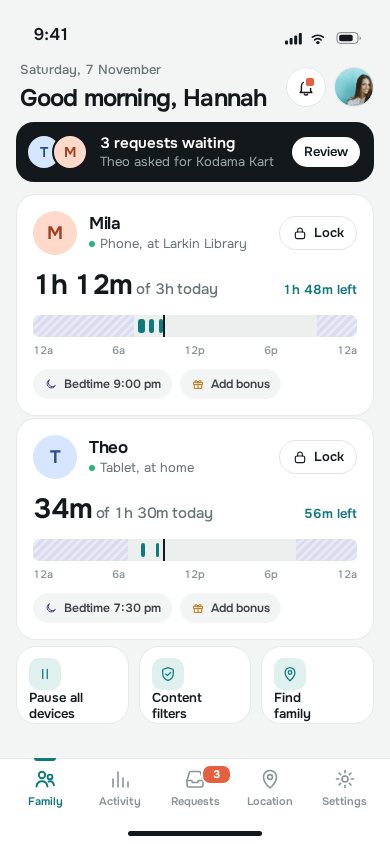
Guardrail is a complete family screen time app for parents: welcome, adding a child, sign in and linking a device, a family home with each child's day rail, a child overview, weekly activity, per app usage, daily and app limits, a bedtime dial, school time, app approval requests with an approved screen, bonus time, content filters by age, live location, devices with lock and ring, notifications, a Plus plan, profile and settings. Pale mist and white with petrol teal, dusk indigo and a warm amber for bonus time.
| Detail | Value |
|---|---|
| Screen type | Home |
| App | Guardrail: Parental controls and screen time |
| Category | Lifestyle |
| Design language | Minimal, light |
| Type | Onest |
| Colours | #f3f5f4 background, #ffffff surface, #12181b text, #687476 text-muted, #0e7a7e accent, #ffffff accent-contrast, #3d3f8f secondary, #e6eae9 border, #e5603f danger |
What this screen says
- Saturday, 7 November
- Good morning, Hannah
- T M
- 3 requests waiting
- Theo asked for Kodama Kart
- Review
- Mila
- Phone, at Larkin Library
- Lock
- 1h 12mof 3h today 1h 48m left
- 12a 6a 12p 6p 12a
- Bedtime 9:00 pm Add bonus
- Theo
- Tablet, at home
- 34mof 1h 30m today 56m left
- Bedtime 7:30 pm Add bonus
- Pause all
- devices
- Content
- filters
- Find
- family
- Activity
- Requests 3
- Location
- Settings
Around it in Guardrail
More home screens
- Kibble Home: Pet supplies and autoship
- Filmlog Home: Film diary and reviews
- Collar Map: GPS pet tracker
- Postage Home: Send parcels and find drop-off points
- Specs Shop: Glasses with virtual try-on
- Circuit Home: Electronics store with trade-in and repairs
- Provenance Shop: Authenticated luxury resale
- Gavel Home: Live online auctions
- Tidy Home: Book home cleaners
- Dorm Home: Find student housing
- Hem Home: Tailoring and alterations, collected
- Lendly Explore: Borrow things from neighbours
Every lifestyle app home screen
What makes a good home screen
- Put the most important thing first. Decide the one thing most people come for, like today's workout, a balance or the next booking, and give it the top of the screen.
- Make it feel current. Greetings with the time of day, today's date, fresh numbers and recent activity tell people the app is alive and about them.
- Keep quick actions within thumb reach. The two or three things people do most should be one tap away, in the lower part of the screen or a floating button.
- Group related content in clear sections. Use headings and spacing so the screen scans as a few blocks, not a long mixed list.
The full home screen guide and every example
Remix Guardrail free: describe your own app and it is drawn in this design. Or get its files from $10: Figma, React Native, SwiftUI, Flutter and HTML.