Templates · Detail screens · Lifestyle app · Toolbox
Toolbox Specs screen
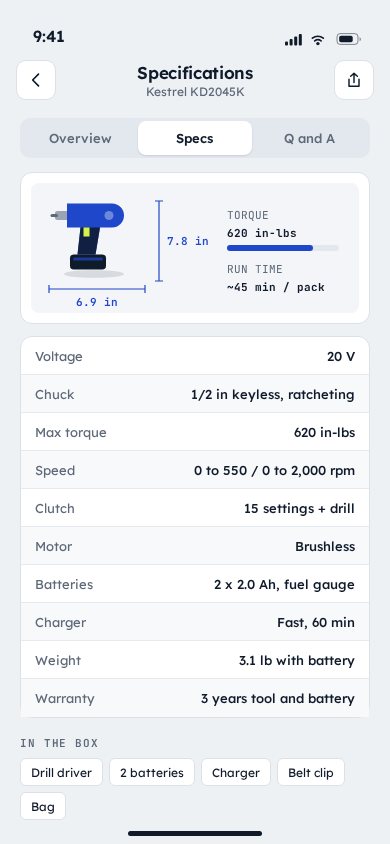
A detail screen from Toolbox, a hardware store and project lists app template in an Enterprise style. Screen 7 of 25.
Toolbox is a complete hardware store app: welcome, choosing a home store, sign in, a home with a ready pickup, the active project and departments, search with aisle, bay and stock on every result, a product page with specs and questions, a store floor plan with a walking route, a barcode scanner, project lists sorted by aisle with a decking calculator, a cart split into pickup and delivery, checkout, order placed, orders and a pickup locker, tool rental with a reservation, a Pro plan with job spend, notifications, profile and settings. Cool grey and white with ink, cobalt and a lime signal.
| Detail | Value |
|---|---|
| Screen type | Detail |
| App | Toolbox: Hardware store and project lists |
| Category | Lifestyle |
| Design language | Enterprise, light |
| Type | Lexend |
| Colours | #eef1f4 background, #ffffff surface, #0f1a2a text, #5d6878 text-muted, #1f47c9 accent, #ffffff accent-contrast, #d4f34a secondary, #dce1e8 border, #cf3a3a danger |
What this screen says
- SpecificationsKestrel KD2045K
- Overview Specs Q and A
- Voltage 20 V
- Chuck 1/2 in keyless, ratcheting
- Max torque 620 in-lbs
- Speed 0 to 550 / 0 to 2,000 rpm
- Clutch 15 settings + drill
- Motor Brushless
- Batteries 2 x 2.0 Ah, fuel gauge
- Charger Fast, 60 min
- Weight 3.1 lb with battery
- Warranty 3 years tool and battery
- In the box
- Drill driver 2 batteries Charger Belt clip Bag
Around it in Toolbox
More detail screens
- Gavel Lot: Live online auctions
- Tidy Deep clean: Book home cleaners
- Dorm Property: Find student housing
- Hem Quote: Tailoring and alterations, collected
- Lendly Item: Borrow things from neighbours
- Stub Artist: Fan to fan ticket resale
- Trove Idea: Visual ideas and boards
- Vidi Playlist: Video platform for creators
- Roll Photo info: Photo library and backups
- Splice Template: Video editor for short clips
- Blush Product: Beauty and makeup shopping
- Flatpack Product: Furniture store with room previews
Every lifestyle app detail screen
What makes a good detail screen
- Lead with what identifies the item. A large image or title, the price or status, and the key facts at the top. People should know they are in the right place at a glance.
- Keep the main action visible. A sticky bottom button for Add to cart, Book or Play stays reachable while people scroll through details.
- Order information by importance. The facts that decide the choice come first; reviews, specifications and fine print further down.
- Use progressive disclosure. Long descriptions, specifications and policies can expand on tap rather than filling the screen.
The full detail screen guide and every example
Remix Toolbox free: describe your own app and it is drawn in this design. Or get its files from $10: Figma, React Native, SwiftUI, Flutter and HTML.