Templates · Detail screens · Lifestyle app · Vidi
Vidi Playlist screen
A detail screen from Vidi, a video platform for creators app template in a Minimal style. Screen 14 of 25.
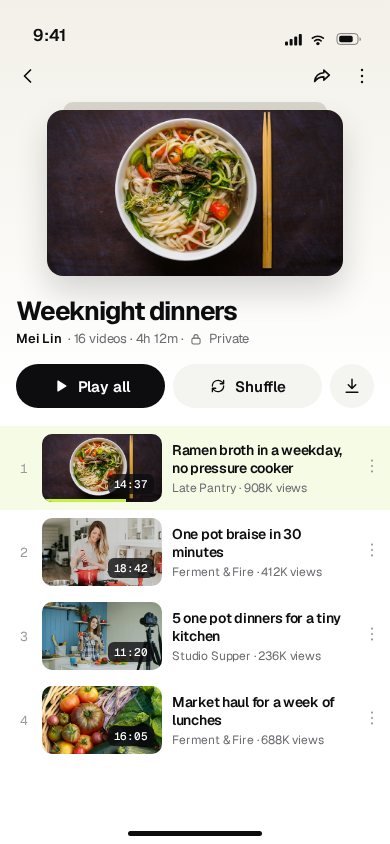
Vidi is a complete video app for watching and making: welcome, topics, sign in, a home feed, the player with chapters and up next, comments, vertical clips, live with chat, search and results, channels, following, library, playlists and downloads, then the creator side: trim an upload, add details, publish, a studio dashboard and per video stats. Channel memberships, a premium plan, notifications, profile and settings. White and warm grey with ink black and one acid lime accent.
| Detail | Value |
|---|---|
| Screen type | Detail |
| App | Vidi: Video platform for creators |
| Category | Lifestyle |
| Design language | Minimal, light |
| Type | Instrument Serif for headings, Geist for text |
| Colours | #ffffff background, #f4f4f1 surface, #0d0d0f text, #6b6b70 text-muted, #c8f03c accent, #0d0d0f accent-contrast, #ececea border, #ff4a3d danger |
What this screen says
- Weeknight dinners
- Mei Lin · 16 videos · 4h 12m · Private
- Play all
- Shuffle
- Ramen broth in a weekday, no pressure cooker
- Late Pantry · 908K views
- One pot braise in 30 minutes
- Ferment & Fire · 412K views
- 5 one pot dinners for a tiny kitchen
- Studio Supper · 236K views
- Market haul for a week of lunches
- Ferment & Fire · 688K views
Around it in Vidi
More detail screens
- Rewear Item: Secondhand fashion marketplace
- Laced Shoe: Sneaker drops and raffles
- Gloss Salon: Salon and spa booking
- Vow Task: Wedding planner
- Drizzle Hourly: Weather with living skies
- Byline Article: Daily news reader
- Shelf Book: Reading tracker and book club
- Marquee Film: Cinema tickets and watchlist
- Handy Cleaning: Home services
- Tasker Furniture assembly: Book and do local odd jobs
- Toolbox Product: Hardware store and project lists
- Brief Full story: News in sixty words
Every lifestyle app detail screen
What makes a good detail screen
- Lead with what identifies the item. A large image or title, the price or status, and the key facts at the top. People should know they are in the right place at a glance.
- Keep the main action visible. A sticky bottom button for Add to cart, Book or Play stays reachable while people scroll through details.
- Order information by importance. The facts that decide the choice come first; reviews, specifications and fine print further down.
- Use progressive disclosure. Long descriptions, specifications and policies can expand on tap rather than filling the screen.
The full detail screen guide and every example
Remix Vidi free: describe your own app and it is drawn in this design. Or get its files from $10: Figma, React Native, SwiftUI, Flutter and HTML.