Templates · List and feed screens · Finance app · Till
Till Notifications screen
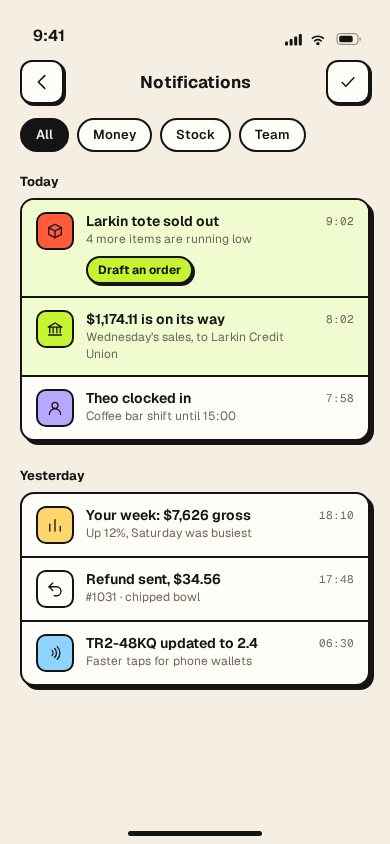
A list screen from Till, a finance app template in a Neubrutalism style. Screen 22 of 25.
Till is a complete point of sale for a small shop: welcome, pairing the card reader, sign in, a today screen with the week's takings, a charge keypad, an item grid with a cart, a customer tip screen, tap to pay, approved and a printed receipt, sales history, a sale with refund, items, stock and a barcode scanner, reports, payouts, closing the day's cash drawer, notifications, a Plus plan, the shop profile and settings. Receipt paper, ink outlines, acid lime and lilac.
| Detail | Value |
|---|---|
| Screen type | List |
| App | Till: Card reader and sales for small shops |
| Category | Finance |
| Design language | Neubrutalism, light |
| Type | Unbounded for headings, Geist for text |
| Colours | #f5efe3 background, #fffdf8 surface, #141414 text, #6e675a text-muted, #c6f432 accent, #141414 accent-contrast, #b9a6ff secondary, #141414 border, #ff5b3a danger |
What this screen says
- Notifications
- All Money Stock Team
- Today
- Larkin tote sold out
- 4 more items are running low
- Draft an order
- $1,174.11 is on its way
- Wednesday’s sales, to Larkin Credit Union
- Theo clocked in
- Coffee bar shift until 15:00
- Yesterday
- Your week: $7,626 gross
- Up 12%, Saturday was busiest
- Refund sent, $34.56
- #1031 · chipped bowl
- TR2-48KQ updated to 2.4
- Faster taps for phone wallets
Around it in Till
More list and feed screens
- Giftly Wallet: Gift cards, sent and stored
- Zap Activity: Pay friends with a note
- Billfold Transactions: Cards, passes and tickets wallet
- Payly Plans: UPI payments, recharges and bills
- Crest Cards: Credit card bills and rewards
- Storefront Orders: Run your online store
- Bastion Pay and transfer: Everyday banking from a big bank
- Later Payments: Buy now, pay in four
- Standing Report: Credit score and reports
- Accrue Pots: Retirement and pension planner
- Levy Income: Taxes for freelancers
- Bullion Holdings: Gold and silver savings
What makes a good list screen
- Show what people need to decide. Each row should carry just enough to choose: a title, one or two details and a status. Everything else belongs on the detail screen.
- Keep rows consistent. The same information in the same place on every row lets people scan down a column instead of reading each item.
- Group with headings. Dates, categories or status headings break long lists into chunks people can skip through.
- Make common actions quick. Swipe actions, a checkbox or a heart on the row save opening the item for small tasks.
The full list screen guide and every example
Remix Till free: describe your own app and it is drawn in this design. Or get its files from $10: Figma, React Native, SwiftUI, Flutter and HTML.