Templates · Search and explore screens · Education app · Tiles
Tiles Explore screen
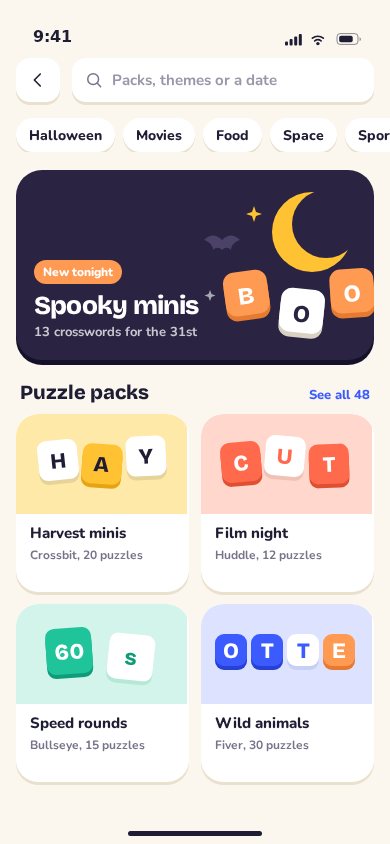
A search screen from Tiles, a daily word and number puzzles app template in a Playful style. Screen 15 of 25.
Tiles is a complete daily puzzle app: welcome, picking your daily mix, sign in, a Today hub with four puzzles and your streak, Fiver (a five letter word in six tries) with its keyboard, a solved screen, guess stats and a shareable result card, Huddle (sort sixteen words into four sets) and its solved board, Crossbit (a five by five mini crossword), Bullseye (hit a target number with six tiles) and its how to play, the archive calendar, themed puzzle packs, overall stats, leagues with a daily leaderboard and a new league form, a Plus plan with checkout, notifications, profile and settings.
| Detail | Value |
|---|---|
| Screen type | Search |
| App | Tiles: Daily word and number puzzles |
| Category | Education |
| Design language | Playful, light |
| Type | Bricolage Grotesque for headings, Nunito for text |
| Colours | #fbf7ef background, #ffffff surface, #1f1d33 text, #77738a text-muted, #3b5bff accent, #ffffff accent-contrast, #ff6a4d secondary, #ece4d4 border, #e04f33 danger |
What this screen says
- Packs, themes or a date
- Halloween
- Movies
- Food
- Space
- Sport
- Easy wins
- New tonightSpooky minis13 crosswords for the 31st
- Puzzle packsSee all 48
- Harvest minisCrossbit, 20 puzzles
- Film nightHuddle, 12 puzzles
- Speed roundsBullseye, 15 puzzles
- Wild animalsFiver, 30 puzzles
Around it in Tiles
More search and explore screens
- Cram Search: Exam prep and mock tests
- Quad Course search: University campus app
- Palm Dictionary: Learn sign language
- Epoch Timeline: History on a timeline
- Wren Library: Early reading for kids
- Proof Topics: Maths tutor that shows its working
- Skim Discover: Speed reading trainer
- Terra Explore: Geography and flags quiz
- Gambit Openings: Chess training
- Buzzer Categories: Live trivia
- Parla Dictionary: Language learning
- Recall Shared decks: Flashcards and spaced repetition
Every education app search screen
What makes a good search screen
- Show something before people type. Recent searches, popular items or categories make the empty search screen useful and save typing.
- Suggest as people type. Autocomplete with matching items, not only matching words, lets people jump straight to a result.
- Make filters visible and reversible. Show active filters as chips that can be removed in one tap, and the number of results as filters change.
- Forgive typos. Close matches and "Did you mean" stop a spelling mistake from ending in an empty screen.
The full search screen guide and every example
Remix Tiles free: describe your own app and it is drawn in this design. Or get its files from $10: Figma, React Native, SwiftUI, Flutter and HTML.