Templates · Detail screens · Productivity app · Streak
Streak freeze screen
A detail screen from Streak, a productivity app template in a Playful style. Screen 16 of 25.
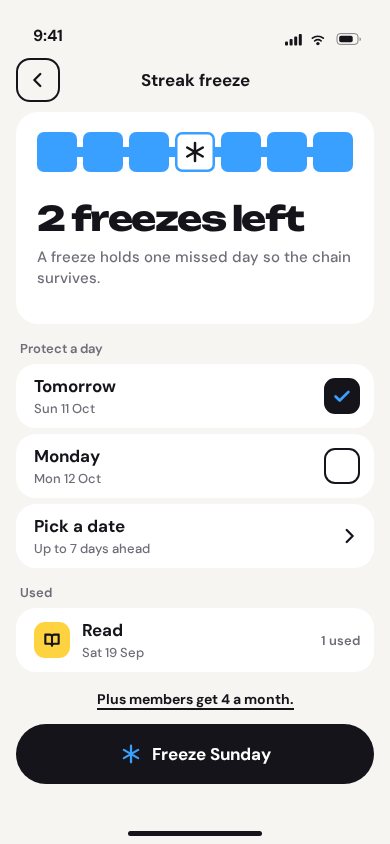
Streak is streak covers a whole habit app: onboarding and habit picking, the daily list with chunky tick buttons, full colour habit pages, quantity check ins, week, month and year walls, streak freezes and a gentle missed day flow. It also has stats and insights, friends and a 30 day challenge, badges, a paywall, profile and settings.
| Detail | Value |
|---|---|
| Screen type | Detail |
| App | Streak: Small days, long chains |
| Category | Productivity |
| Design language | Playful, light |
| Type | DM Sans |
| Colours | #f6f5f1 background, #ffffff surface, #15141a text, #6f6d78 text-muted, #ff4b33 accent, #15141a accent-contrast, #ffd23f secondary, #e4e2da border, #ff4b33 danger |
What this screen says
- Streak freeze
- 2 freezes left
- A freeze holds one missed day so the chain survives.
- Protect a day
- TomorrowSun 11 Oct
- MondayMon 12 Oct
- Pick a dateUp to 7 days ahead
- Used
- ReadSat 19 Sep
- 1 used
- Plus members get 4 a month.
- Freeze Sunday
Around it in Streak
More detail screens
- Kanso Project: Tasks, calendar and chat
- Margin Notebook: AI note taking
- Aide Meeting brief: Executive AI assistant
- Juno Chat: AI chat assistant
- Opal Project: Studio dashboard
- Jot Note: Quick notes and checklists
- Chrono City: World clock, timers and stopwatch
- Frontdesk Ticket: Customer support inbox
- Campaign: Email marketing campaigns
- Outpost Previews: Schedule social posts
- Pageview Channel: Website analytics
- Polish Suggestion: Writing assistant and keyboard
Every productivity app detail screen
What makes a good detail screen
- Lead with what identifies the item. A large image or title, the price or status, and the key facts at the top. People should know they are in the right place at a glance.
- Keep the main action visible. A sticky bottom button for Add to cart, Book or Play stays reachable while people scroll through details.
- Order information by importance. The facts that decide the choice come first; reviews, specifications and fine print further down.
- Use progressive disclosure. Long descriptions, specifications and policies can expand on tap rather than filling the screen.
The full detail screen guide and every example
Remix Streak free: describe your own app and it is drawn in this design. Or get its files from $10: Figma, React Native, SwiftUI, Flutter and HTML.