Templates · Player, camera and editor screens · Productivity app · Stow
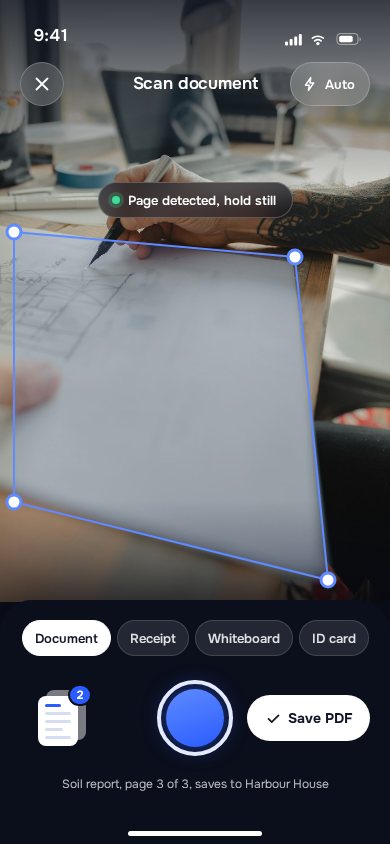
Stow Scan document screen
A media screen from Stow, a cloud storage app template in a Minimal style. Screen 18 of 25.
Stow is a complete cloud storage app: onboarding, sign in, a home with suggested files and storage at a glance, files in list and grid, folders, document and photo previews, file details, sharing with people and links, shared with me, starred, offline, search, uploads with a live queue, move to, document scanning, a storage breakdown with clean up, the bin, activity, plans, account and settings. Pale sky and white with cobalt blue and five file type colours.
| Detail | Value |
|---|---|
| Screen type | Media |
| App | Stow: Cloud storage |
| Category | Productivity |
| Design language | Minimal, light |
| Type | Onest |
| Colours | #f2f6ff background, #ffffff surface, #101528 text, #667091 text-muted, #2a5cff accent, #ffffff accent-contrast, #8b5cf6 secondary, #e1e8f8 border, #e5484d danger |
What this screen says
- Scan document
- Auto
- Page detected, hold still
- DocumentReceiptWhiteboardID card
- Save PDF
- Soil report, page 3 of 3, saves to Harbour House
Around it in Stow
More player, camera and editor screens
- Staffroom Scan receipt: HR, payslips and time off
- Ping Video test: Internet speed test
- Glance Camera: Visual search with the camera
- Replay Recording: Record and share screen videos
- Easel Board: Collaborative whiteboard
- Token Scan code: Two-factor codes and sign-in approvals
- Beam Preview: Send big files
- Parchment Editing: Documents, edit and share
- Lectern Editor: Slides and presenter remote
- Ringer Incoming call: Phone, contacts and voicemail
- Pipeline Voice note: Sales CRM on the road
- Aim Weekly brief: Goals and key results
Every productivity app media screen
What makes a good media player screen
- Content takes the space. Artwork, video or the camera view should fill most of the screen.
- Primary controls in the thumb zone. Play and pause, the shutter or the main tool, large and low on the screen.
- Show progress and position. A scrubber with elapsed and remaining time, or the step in a lesson.
- Hide secondary controls until needed. Lyrics, queue, filters and advanced tools can live behind a tap or a swipe.
The full media player screen guide and every example
Remix Stow free: describe your own app and it is drawn in this design. Or get its files from $10: Figma, React Native, SwiftUI, Flutter and HTML.