Templates · Onboarding screens · Lifestyle app · Splice
Splice Welcome screen
An onboarding screen from Splice, a video editor for short clips app template in a Dark-first style. Screen 1 of 25.
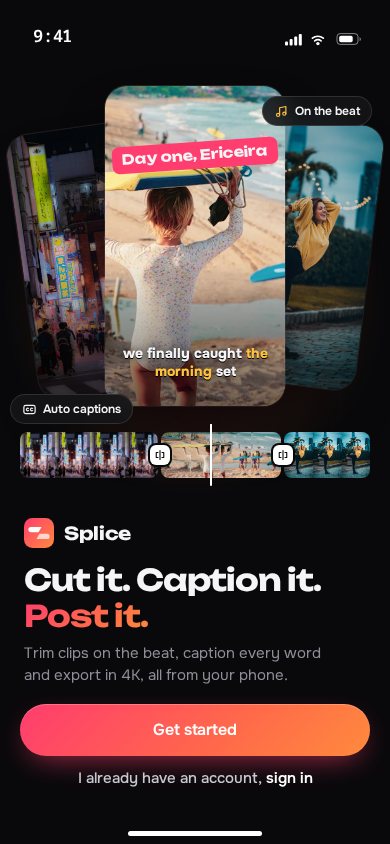
Splice is a complete short video editor: welcome and sign in, a home with a new project card, quick tools and drafts, a camera with segment recording, a media picker, the multi-track editor, clip trim, speed curves, text styling, auto captions, a sound library, effects, filters and adjust, canvas and background, templates and a template preview, export settings, live export progress and a saved screen, drafts, cloud storage stats, notifications, a Pro plan, profile and settings. Near black with a hot pink to tangerine gradient and colour coded timeline lanes.
| Detail | Value |
|---|---|
| Screen type | Onboarding |
| App | Splice: Video editor for short clips |
| Category | Lifestyle |
| Design language | Dark-first, dark |
| Type | Unbounded for headings, Onest for text |
| Colours | #09090b background, #141417 surface, #f5f5f7 text, #8e8e98 text-muted, #ff3d6e accent, #ffffff accent-contrast, #ffc23d secondary, #26262c border, #ff5a52 danger |
What this screen says
- Day one, Ericeira
- we finally caught the morning set
- Auto captions
- On the beat
- Splice
- Cut it. Caption it.
- Post it.
- Trim clips on the beat, caption every word and export in 4K, all from your phone.
- Get started
- I already have an account, sign in
Around it in Splice
More onboarding screens
- Gavel Welcome: Live online auctions
- Tidy Welcome: Book home cleaners
- Dorm Welcome: Find student housing
- Hem Welcome: Tailoring and alterations, collected
- Lendly Welcome: Borrow things from neighbours
- Stub Welcome: Fan to fan ticket resale
- Trove Welcome: Visual ideas and boards
- Vidi Welcome: Video platform for creators
- Roll Welcome: Photo library and backups
- Blush Welcome: Beauty and makeup shopping
- Flatpack Welcome: Furniture store with room previews
- Column Welcome: Newsletters and independent writers
Every lifestyle app onboarding screen
What makes a good onboarding screen
- One idea per screen. Each screen should say one thing in a headline people can read in a second. If a screen needs a paragraph, it is doing too much.
- Personalise with a purpose. Ask a question only if the answer changes what people see next, like a goal, a level or an interest. Then show that the answer mattered.
- Explain permissions before asking. Show your own screen saying why you need notifications, location or the camera before the system prompt. People who understand the reason are more likely to allow it.
- Let people skip. A visible skip or "I'll do this later" respects returning users and the impatient. Make sure skipping still lands them somewhere useful.
The full onboarding screen guide and every example
Remix Splice free: describe your own app and it is drawn in this design. Or get its files from $10: Figma, React Native, SwiftUI, Flutter and HTML.