Templates · List and feed screens · Lifestyle app · Specs
Specs Notifications screen
A list screen from Specs, a glasses with virtual try-on app template in a Luxury style. Screen 23 of 25.
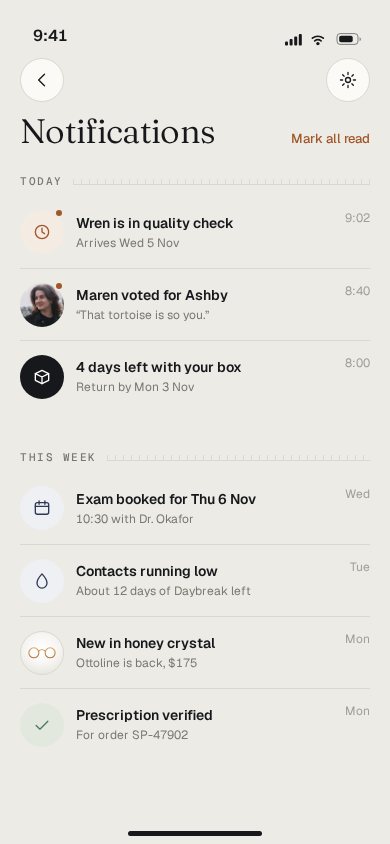
Specs is a complete eyewear app: welcome, a fit quiz, sign in, a shop home, browse and filters by width, shape and colour, a frame page with its measurements, a camera try-on with frames on your face, saved looks to compare, a five frame home try-on box, lenses, coatings and prescription, bag, checkout and order placed, lab tracking, eye exam booking and confirmation, contacts reorder, an eye health dashboard, a club plan, notifications, profile and settings. Stone and porcelain with ink and tortoise amber.
| Detail | Value |
|---|---|
| Screen type | List |
| App | Specs: Glasses with virtual try-on |
| Category | Lifestyle |
| Design language | Luxury, light |
| Type | Fraunces for headings, Geist for text |
| Colours | #ecebe6 background, #fbfaf7 surface, #17181c text, #7b7870 text-muted, #a3562a accent, #ffffff accent-contrast, #2c3a55 secondary, #dcd8cf border, #b5432f danger |
What this screen says
- Notifications
- Mark all read
- Today
- Wren is in quality checkArrives Wed 5 Nov
- Maren voted for Ashby“That tortoise is so you.”
- 4 days left with your boxReturn by Mon 3 Nov
- This week
- Exam booked for Thu 6 Nov10:30 with Dr. Okafor
- Wed
- Contacts running lowAbout 12 days of Daybreak left
- Tue
- New in honey crystalOttoline is back, $175
- Mon
- Prescription verifiedFor order SP-47902
Around it in Specs
More list and feed screens
- Stub Listings: Fan to fan ticket resale
- Trove Boards: Visual ideas and boards
- Vidi Comments: Video platform for creators
- Roll Albums: Photo library and backups
- Splice Add media: Video editor for short clips
- Blush Lipstick: Beauty and makeup shopping
- Flatpack Room: Furniture store with room previews
- Column Comments: Newsletters and independent writers
- Fetch Sitters: Dog walkers and pet sitters
- Forecourt Results: Buy and sell used cars
- Tower Bills: Mobile plan, data and bills
- Haul Flash sale: Bargain fashion and finds
Every lifestyle app list screen
What makes a good list screen
- Show what people need to decide. Each row should carry just enough to choose: a title, one or two details and a status. Everything else belongs on the detail screen.
- Keep rows consistent. The same information in the same place on every row lets people scan down a column instead of reading each item.
- Group with headings. Dates, categories or status headings break long lists into chunks people can skip through.
- Make common actions quick. Swipe actions, a checkbox or a heart on the row save opening the item for small tasks.
The full list screen guide and every example
Remix Specs free: describe your own app and it is drawn in this design. Or get its files from $10: Figma, React Native, SwiftUI, Flutter and HTML.