Templates · Paywall screens · Lifestyle app · Specs
Specs Club screen
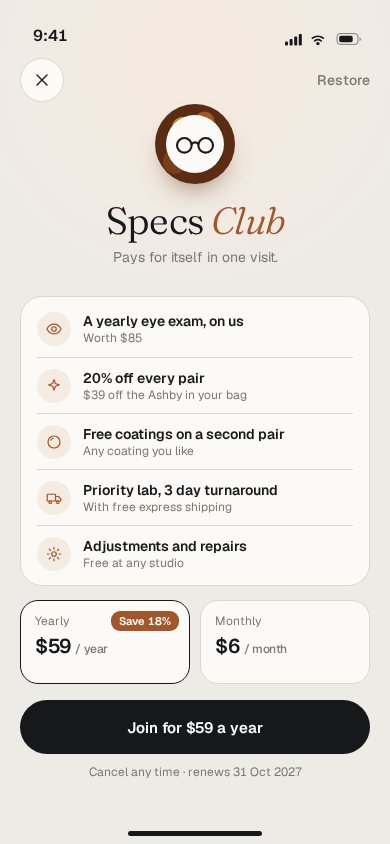
A paywall screen from Specs, a glasses with virtual try-on app template in a Luxury style. Screen 22 of 25.
Specs is a complete eyewear app: welcome, a fit quiz, sign in, a shop home, browse and filters by width, shape and colour, a frame page with its measurements, a camera try-on with frames on your face, saved looks to compare, a five frame home try-on box, lenses, coatings and prescription, bag, checkout and order placed, lab tracking, eye exam booking and confirmation, contacts reorder, an eye health dashboard, a club plan, notifications, profile and settings. Stone and porcelain with ink and tortoise amber.
| Detail | Value |
|---|---|
| Screen type | Paywall |
| App | Specs: Glasses with virtual try-on |
| Category | Lifestyle |
| Design language | Luxury, light |
| Type | Fraunces for headings, Geist for text |
| Colours | #ecebe6 background, #fbfaf7 surface, #17181c text, #7b7870 text-muted, #a3562a accent, #ffffff accent-contrast, #2c3a55 secondary, #dcd8cf border, #b5432f danger |
What this screen says
- Restore
- Specs Club
- Pays for itself in one visit.
- A yearly eye exam, on usWorth $85
- 20% off every pair$39 off the Ashby in your bag
- Free coatings on a second pairAny coating you like
- Priority lab, 3 day turnaroundWith free express shipping
- Adjustments and repairsFree at any studio
- Save 18%Yearly $59 / year
- Monthly $6 / month
- Join for $59 a year
- Cancel any time · renews 31 Oct 2027
Around it in Specs
More paywall screens
- Mane Pro: AI hairstyle try-on
- Annex Pro: AI interior redesign
- Kino Plans: Film and series streaming
- Waybill Plus: Every parcel, read like its label
- Torque Plus: The workshop manual for your own car
- Vetly Plus: Pet health record
- Stitch Plus: A knitting companion drawn as one big knitting chart
- Roost Plus: Your shared house, stuck to the fridge door
- Trellis Plus: Vegetable garden planner
- Grain Pro: Camera and photo editor
- Posy weekly: Flower delivery and weekly stems
- Fern Plus: Plant care
Every lifestyle app paywall screen
What makes a good paywall screen
- Lead with the outcome, not the feature list. The headline should say what changes for the person: "Train smarter every week" beats "Unlock Premium". Three to five benefits underneath are enough; more turns into a wall of ticks nobody reads.
- Show the real price, period and trial terms. State the price, how often it renews and when a free trial turns into a charge, near the button. Apple's App Store guideline 3.1.2 asks subscription apps to make this clear before purchase, and Google Play has similar rules.
- One primary button. The main call to action should be impossible to miss and say what happens: "Start 7-day free trial" or "Subscribe for $4.99/month". A second plan choice is fine; a second competing button is not.
- Make the plans easy to compare. When you offer monthly and yearly, show both prices in the same unit (per month or per week) and mark the saving on the yearly plan in plain numbers, not just a badge.
The full paywall screen guide and every example
Remix Specs free: describe your own app and it is drawn in this design. Or get its files from $10: Figma, React Native, SwiftUI, Flutter and HTML.