Templates · List and feed screens · Lifestyle app · Tower
Tower Bills screen
A list screen from Tower, a lifestyle app template in a Playful style. Screen 11 of 25.
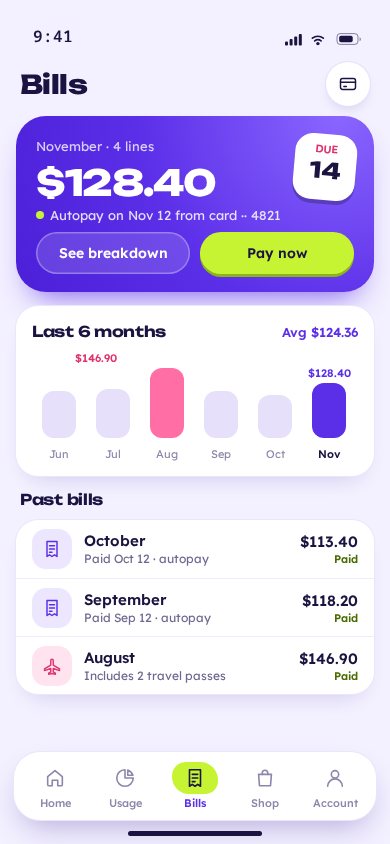
Tower is a complete mobile carrier app: welcome, sign in with a phone number and a one time code, a home with the data ring for this cycle, minutes, texts and hotspot, usage by day and by app, plan details, plans to switch to, data top ups with checkout and a success screen, bills with a line by line breakdown and pay bill, roaming with a travel pass, family lines with limits, eSIM setup with a QR code, a phone shop with a phone page, live network status on a map, a support chat, notifications, account and settings. Lilac and white with signal violet, electric lime and a pop of pink.
| Detail | Value |
|---|---|
| Screen type | List |
| App | Tower: Mobile plan, data and bills |
| Category | Lifestyle |
| Design language | Playful, light |
| Type | Unbounded for headings, Lexend for text |
| Colours | #f3f0ff background, #ffffff surface, #1b1340 text, #6e6890 text-muted, #5b2ee8 accent, #ffffff accent-contrast, #c6f432 secondary, #e6e0fa border, #ff4f6d danger |
What this screen says
- Bills
- November · 4 lines
- Autopay on Nov 12 from card ·· 4821
- DUE14
- See breakdown
- Pay now
- Last 6 months
- Avg $124.36
- Past bills
- OctoberPaid Oct 12 · autopay
- Paid
- SeptemberPaid Sep 12 · autopay
- AugustIncludes 2 travel passes
- Home
- Usage
- Shop
- Account
Around it in Tower
More list and feed screens
- Splice Add media: Video editor for short clips
- Blush Lipstick: Beauty and makeup shopping
- Flatpack Room: Furniture store with room previews
- Column Comments: Newsletters and independent writers
- Fetch Sitters: Dog walkers and pet sitters
- Forecourt Results: Buy and sell used cars
- Haul Flash sale: Bargain fashion and finds
- Muse Styles: AI image studio
- Admit This weekend: Events and tickets near you
- Arcade Autumn sale: Game store, library and friends
- Natal Aspects: Birth charts and daily astrology
- Sillage Wardrobe: Fragrance wardrobe
Every lifestyle app list screen
What makes a good list screen
- Show what people need to decide. Each row should carry just enough to choose: a title, one or two details and a status. Everything else belongs on the detail screen.
- Keep rows consistent. The same information in the same place on every row lets people scan down a column instead of reading each item.
- Group with headings. Dates, categories or status headings break long lists into chunks people can skip through.
- Make common actions quick. Swipe actions, a checkbox or a heart on the row save opening the item for small tasks.
The full list screen guide and every example
Remix Tower free: describe your own app and it is drawn in this design. Or get its files from $10: Figma, React Native, SwiftUI, Flutter and HTML.