Templates · List and feed screens · Lifestyle app · Roll
Roll Albums screen
A list screen from Roll, a photo library and backups app template in a Minimal style. Screen 11 of 25.
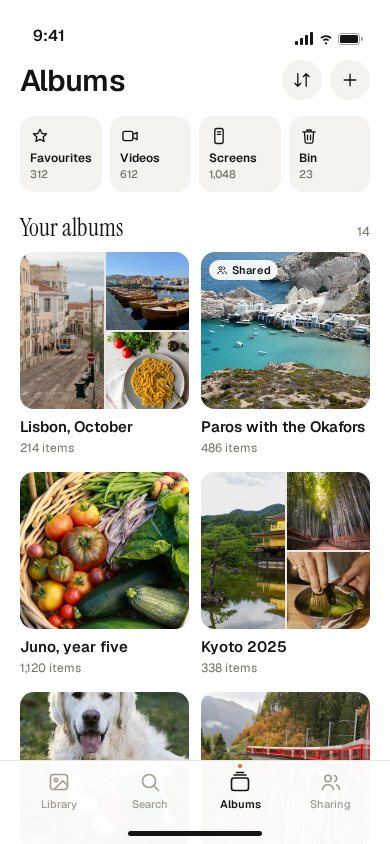
Roll is a complete photo library app: welcome, choosing what to back up, sign in, a library grid grouped by day, a photo viewer with its details, an editor, search by people, places and things, results, a person's photos, albums and an album, a memory story, a new album, sharing a link, shared albums and a partner library, live backup progress, storage and a clean up review, ordering prints with confirmation, a storage plan, activity, account and settings. White and warm grey with near black ink and a persimmon accent.
| Detail | Value |
|---|---|
| Screen type | List |
| App | Roll: Photo library and backups |
| Category | Lifestyle |
| Design language | Minimal, light |
| Type | Instrument Serif for headings, Geist for text |
| Colours | #ffffff background, #f4f3ef surface, #141413 text, #76736b text-muted, #ff5a1f accent, #fff0e8 accent-soft, #e9e7e1 border, #1f9d5c success, #e5383b danger |
What this screen says
- Albums
- Favourites
- 312 Videos
- 612 Screens
- 1,048 Bin
- Your albums
- Lisbon, October214 items
- SharedParos with the Okafors486 items
- Juno, year five1,120 items
- Kyoto 2025338 items
- Biscuit1,380 items
- Swiss rail week142 items
- Library Search Albums Sharing
Around it in Roll
More list and feed screens
- Posy Shop: Flower delivery and weekly stems
- Fern Reminders: Plant care
- Doorstep Results: Homes for sale and rent
- Rewear Offers: Secondhand fashion marketplace
- Laced Calendar: Sneaker drops and raffles
- Gloss Salons: Salon and spa booking
- Vow Notifications: Wedding planner
- Drizzle 10 day: Weather with living skies
- Byline Sections: Daily news reader
- Shelf Notifications: Reading tracker and book club
- Marquee Reviews: Cinema tickets and watchlist
- Handy Choose a pro: Home services
Every lifestyle app list screen
What makes a good list screen
- Show what people need to decide. Each row should carry just enough to choose: a title, one or two details and a status. Everything else belongs on the detail screen.
- Keep rows consistent. The same information in the same place on every row lets people scan down a column instead of reading each item.
- Group with headings. Dates, categories or status headings break long lists into chunks people can skip through.
- Make common actions quick. Swipe actions, a checkbox or a heart on the row save opening the item for small tasks.
The full list screen guide and every example
Remix Roll free: describe your own app and it is drawn in this design. Or get its files from $10: Figma, React Native, SwiftUI, Flutter and HTML.