Templates · Form and input screens · Social app · Spark
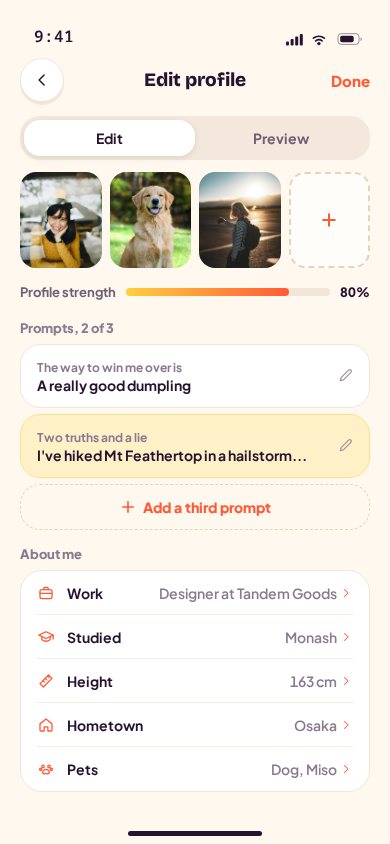
Spark Edit profile screen
A form screen from Spark, a swipe dating app template in a Playful style. Screen 15 of 25.
Spark is a complete swipe dating app: welcome, phone sign in and code, the basics and photos, a discover deck with a common ground sticker, a full profile with prompts, filters, the match moment, likes behind a paywall, chats with new matches, a conversation that turns into a date plan, a video date with icebreakers, answering a prompt, edit profile, buying and running a Boost, booking the date and its confirmation, explore rooms, insights, notifications, a Plus plan, your profile and settings. Warm cream with tangerine, butter yellow, lilac and deep plum.
| Detail | Value |
|---|---|
| Screen type | Form |
| App | Spark: Swipe dating |
| Category | Social |
| Design language | Playful, light |
| Type | Bricolage Grotesque for headings, Plus Jakarta Sans for text |
| Colours | #fff8ef background, #ffffff surface, #26132f text, #8a7a8f text-muted, #ff5a36 accent, #ffffff accent-contrast, #ffcf3d secondary, #f1e6d8 border, #e5384f danger |
What this screen says
- Done
- Edit profile
- Edit Preview
- Profile strength
- Prompts, 2 of 3
- The way to win me over is
- A really good dumpling
- Two truths and a lie
- I've hiked Mt Feathertop in a hailstorm...
- Add a third prompt
- About me
- WorkDesigner at Tandem Goods
- StudiedMonash
- Height163 cm
- HometownOsaka
- PetsDog, Miso
Around it in Spark
More form and input screens
- Cohort Request intro: Alumni and mentor network
- Kin New moment: Private family circle
- Confetti RSVP: Party invites and RSVPs
- Ripple Edit note: Voice notes social
- Duo Daily question: An app for two
- Soapbox Write a take: Weekly debates and polls
- Ballot New poll: Settle it on paper
- Murmur New room: Chat rooms for art lovers
- Wink Interests: Video first dating
- Snoot Add your pet: Social app for pets
- Huddle New event: Interest groups and meetups
- Glade Caption: Photo and clip social network
What makes a good form screen
- Ask only what you need. Every field is a reason to stop. Remove optional fields or move them to later.
- Labels above fields. Visible labels stay readable while people type; placeholder-only labels disappear.
- Use the right keyboard and input. Number pads for amounts, email keyboards for email, pickers for dates and autofill for addresses and codes.
- Validate as people go. Show problems next to the field when people leave it, in words that say how to fix them.
The full form screen guide and every example
Remix Spark free: describe your own app and it is drawn in this design. Or get its files from $10: Figma, React Native, SwiftUI, Flutter and HTML.