Templates · Form and input screens · Social app · Confetti
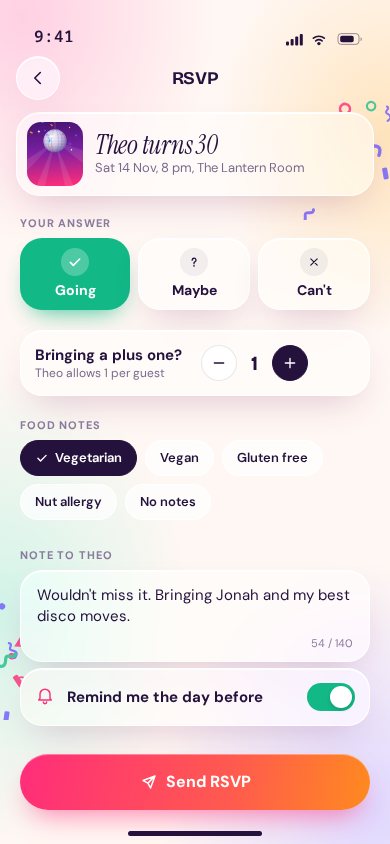
Confetti RSVP screen
A form screen from Confetti, a party invites and RSVPs app template in a Glass style. Screen 5 of 25.
Confetti is a complete party app: welcome, sign in, a home with the invite waiting on you, the invite itself with a tear-off RSVP stub, an RSVP form and a confirmation, a gift list, then the host side: a new party, a gallery of invite designs, the invite editor, adding guests, review and send, invites sent, the party page, the guest list, an RSVP tracker, a potluck, the party chat and live arrivals on a map. Plus a calendar, a shared photo wall, notifications, a Plus plan, profile and settings. Sherbet glass with hot pink, tangerine and confetti in six colours.
| Detail | Value |
|---|---|
| Screen type | Form |
| App | Confetti: Party invites and RSVPs |
| Category | Social |
| Design language | Glass, light |
| Type | Bricolage Grotesque for headings, DM Sans for text |
| Colours | #fff7f3 background, #ffffff surface, #24123d text, #7a6b8c text-muted, #ff2d7a accent, #ffffff accent-contrast, #6d5cff secondary, #12b886 success, #ff9f1c warning, #ead9e6 border |
What this screen says
- RSVP
- Theo turns 30Sat 14 Nov, 8 pm, The Lantern Room
- Your answer
- Going
- Maybe
- Can't
- Bringing a plus one?Theo allows 1 per guest
- Food notes
- Vegetarian Vegan Gluten free Nut allergy No notes
- Note to Theo
- Wouldn't miss it. Bringing Jonah and my best disco moves.54 / 140
- Remind me the day before
- Send RSVP
Around it in Confetti
More form and input screens
- Wink Interests: Video first dating
- Snoot Add your pet: Social app for pets
- Huddle New event: Interest groups and meetups
- Glade Caption: Photo and clip social network
- Onair Go live: Live streaming
- Drift Start a room: Reels and voice rooms
- Glitz Go live: Party live streaming
- Hearth New circle: Messenger for trips and circles
- Chirp Your profile: Messenger with file sharing
- Banter Set up profile: Live messenger
- Natter New contact: Minimal messenger
- Nearly About you: Dating by crossed paths
What makes a good form screen
- Ask only what you need. Every field is a reason to stop. Remove optional fields or move them to later.
- Labels above fields. Visible labels stay readable while people type; placeholder-only labels disappear.
- Use the right keyboard and input. Number pads for amounts, email keyboards for email, pickers for dates and autofill for addresses and codes.
- Validate as people go. Show problems next to the field when people leave it, in words that say how to fix them.
The full form screen guide and every example
Remix Confetti free: describe your own app and it is drawn in this design. Or get its files from $10: Figma, React Native, SwiftUI, Flutter and HTML.