Templates · Form and input screens · Social app · Cohort
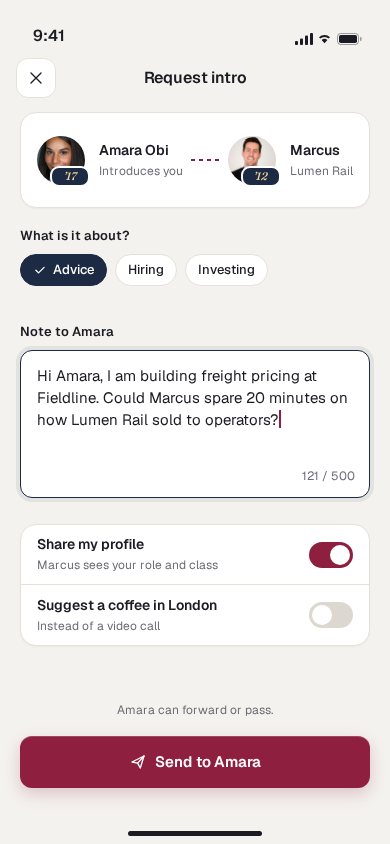
Cohort Request intro screen
A form screen from Cohort, an alumni and mentor network app template in an Enterprise style. Screen 7 of 25.
Cohort is a complete alumni network: welcome, school sign in, claiming your alumni record, a home with your class and suggested people, a searchable directory, alumni profiles with the warmest intro path, a request intro flow, mentor matching with booking and a live video session, inbox and chat, reunions and events with tickets, an alumni referral job board, a network dashboard, a paid plan, notifications, profile and settings. Parchment and white with claret, Oxford navy and a touch of old gold.
| Detail | Value |
|---|---|
| Screen type | Form |
| App | Cohort: Alumni and mentor network |
| Category | Social |
| Design language | Enterprise, light |
| Type | Fraunces for headings, Geist for text |
| Colours | #f4f2ee background, #ffffff surface, #1a1b23 text, #6e6b75 text-muted, #8e1f3f accent, #f6e7ec accent-tint, #1d2a44 secondary, #c9a24c highlight, #e6e1d8 border, #2f7d5b success |
What this screen says
- Request intro
- ’17
- Amara ObiIntroduces you
- ’12
- MarcusLumen Rail
- What is it about?
- Advice Hiring Investing
- Note to Amara
- Hi Amara, I am building freight pricing at Fieldline. Could Marcus spare 20 minutes on how Lumen Rail sold to...
- Share my profileMarcus sees your role and class
- Suggest a coffee in LondonInstead of a video call
- Amara can forward or pass.
- Send to Amara
Around it in Cohort
More form and input screens
- Agora Reply: Communities, threads and votes
- Spark About you: Swipe dating
- Candid Review: One real photo a day
- Blink Send to: Camera chat and stories
- Cipher Disappearing messages: Encrypted private messenger
- Commons New post: Friends, groups and events
- Tether Join circle: Family location and safety
- Facet Call link: Video calls with family and friends
- Stoop New post: Neighbourhood noticeboard
- Aura Drop a mood: Moods with close friends
- Kindly Log hours: Volunteering near you
- Kin New moment: Private family circle
What makes a good form screen
- Ask only what you need. Every field is a reason to stop. Remove optional fields or move them to later.
- Labels above fields. Visible labels stay readable while people type; placeholder-only labels disappear.
- Use the right keyboard and input. Number pads for amounts, email keyboards for email, pickers for dates and autofill for addresses and codes.
- Validate as people go. Show problems next to the field when people leave it, in words that say how to fix them.
The full form screen guide and every example
Remix Cohort free: describe your own app and it is drawn in this design. Or get its files from $10: Figma, React Native, SwiftUI, Flutter and HTML.