Templates · List and feed screens · Social app · Snoot
Snoot Notifications screen
A list screen from Snoot, a social app for pets app template in a Dark-first style. Screen 20 of 25.
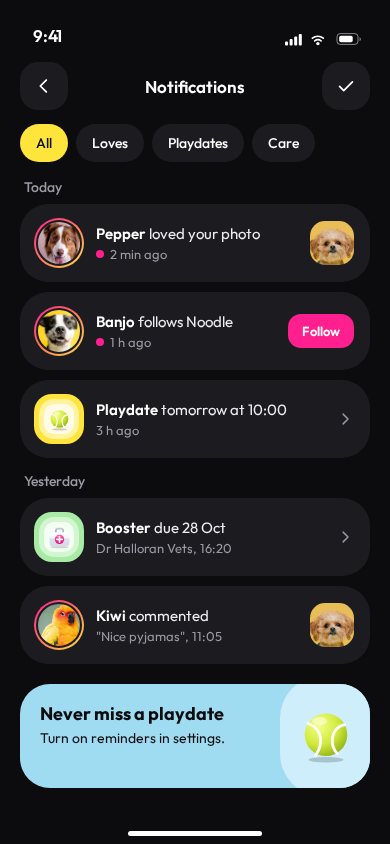
Snoot is a complete social app for pets: onboarding, sign in, adding a pet, a photo feed with stories, posts and comments, an explore screen for pets, parks, vets, food and schools, a dark map with a glowing route, place and pet profiles, playdates from plan to confirmation, messages, notifications, pet stats, a care log, a paid plan, profile and settings. Black and charcoal with hot pink, a yellow glow and candy pastels.
| Detail | Value |
|---|---|
| Screen type | List |
| App | Snoot: Social app for pets |
| Category | Social |
| Design language | Dark-first, dark |
| Type | Outfit |
| Colours | #0c0c0e background, #1c1c20 surface, #ffffff text, #9a9aa6 text-muted, #ff1f8f accent, #ffffff accent-contrast, #ffe24a secondary, #2c2c32 border, #ff5a5a danger |
What this screen says
- Notifications
- All Loves Playdates Care
- Today
- Pepper loved your photo
- 2 min ago
- Banjo follows Noodle
- 1 h ago
- Follow
- Playdate tomorrow at 10:00
- 3 h ago
- Yesterday
- Booster due 28 Oct
- Dr Halloran Vets, 16:20
- Kiwi commented
- "Nice pyjamas", 11:05
- Never miss a playdate
- Turn on reminders in settings.
Around it in Snoot
More list and feed screens
- Blink Chats: Camera chat and stories
- Cipher Note to self: Encrypted private messenger
- Commons Friends: Friends, groups and events
- Tether History: Family location and safety
- Facet Circles: Video calls with family and friends
- Stoop Free stuff: Neighbourhood noticeboard
- Aura Circles: Moods with close friends
- Kindly My shifts: Volunteering near you
- Cohort Mentors: Alumni and mentor network
- Kin Moments: Private family circle
- Confetti Gift list: Party invites and RSVPs
- Ripple Replies: Voice notes social
What makes a good list screen
- Show what people need to decide. Each row should carry just enough to choose: a title, one or two details and a status. Everything else belongs on the detail screen.
- Keep rows consistent. The same information in the same place on every row lets people scan down a column instead of reading each item.
- Group with headings. Dates, categories or status headings break long lists into chunks people can skip through.
- Make common actions quick. Swipe actions, a checkbox or a heart on the row save opening the item for small tasks.
The full list screen guide and every example
Remix Snoot free: describe your own app and it is drawn in this design. Or get its files from $10: Figma, React Native, SwiftUI, Flutter and HTML.