Templates · List and feed screens · Social app · Kindly
Kindly My shifts screen
A list screen from Kindly, a volunteering near you app template in a Playful style. Screen 12 of 25.
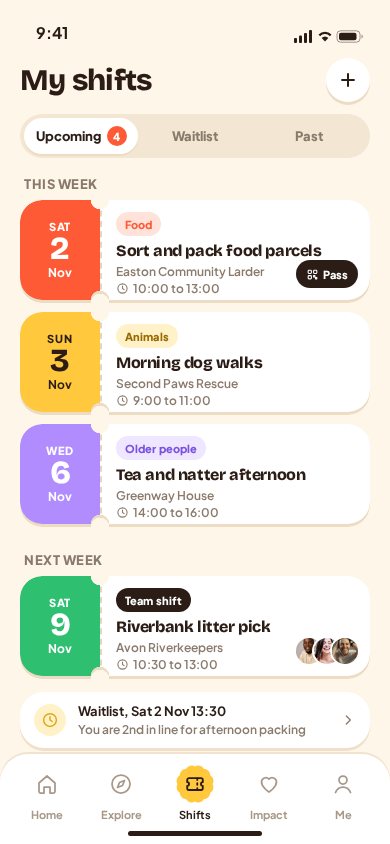
Kindly is a complete local volunteering app: welcome, picking causes, sign in, a home with your next shift ticket, explore with a list and a map of rosette pins, an opportunity, a charity page, picking a shift, confirming and a booked screen, your shifts, a day of check in with a route and a QR pass, a live shift timer, a thank you note, logging hours, an impact dashboard, rosette badges, teams, a team page, a charity story, notifications, Kindly Plus, profile and settings. Warm oat and white with tomato, sunflower and four more cause colours.
| Detail | Value |
|---|---|
| Screen type | List |
| App | Kindly: Volunteering near you |
| Category | Social |
| Design language | Playful, light |
| Type | Bricolage Grotesque for headings, Plus Jakarta Sans for text |
| Colours | #fff6ea background, #ffffff surface, #2b1d16 text, #8a7a6c text-muted, #ff5a36 accent, #ffffff accent-contrast, #ffc83d secondary, #f1e3cf border, #e5484d danger |
What this screen says
- My shifts
- Upcoming 4 Waitlist Past
- THIS WEEK
- SAT2Nov
- Food
- Sort and pack food parcels
- Easton Community Larder
- 10:00 to 13:00
- Pass
- SUN3Nov
- Animals
- Morning dog walks
- Second Paws Rescue
- 9:00 to 11:00
- WED6Nov
- Older people
- Tea and natter afternoon
- Greenway House
- 14:00 to 16:00
- NEXT WEEK
- SAT9Nov
- Team shift
- Riverbank litter pick
- Avon Riverkeepers
- 10:30 to 13:00
- Waitlist, Sat 2 Nov 13:30You are 2nd in line for afternoon packing
- Home
- Explore
- Shifts
- Impact
Around it in Kindly
More list and feed screens
- Wink Likes: Video first dating
- Snoot Places: Social app for pets
- Huddle Notifications: Interest groups and meetups
- Glade Comments: Photo and clip social network
- Onair Notifications: Live streaming
- Drift Comments: Reels and voice rooms
- Glitz Live now: Party live streaming
- Hearth Shared album: Messenger for trips and circles
- Chirp Chat actions: Messenger with file sharing
- Banter New chat: Live messenger
- Natter Start new: Minimal messenger
- Nearly Crossed paths: Dating by crossed paths
What makes a good list screen
- Show what people need to decide. Each row should carry just enough to choose: a title, one or two details and a status. Everything else belongs on the detail screen.
- Keep rows consistent. The same information in the same place on every row lets people scan down a column instead of reading each item.
- Group with headings. Dates, categories or status headings break long lists into chunks people can skip through.
- Make common actions quick. Swipe actions, a checkbox or a heart on the row save opening the item for small tasks.
The full list screen guide and every example
Remix Kindly free: describe your own app and it is drawn in this design. Or get its files from $10: Figma, React Native, SwiftUI, Flutter and HTML.