Templates · List and feed screens · Social app · Cipher
Cipher Note to self screen
A list screen from Cipher, an encrypted private messenger app template in a Dark-first style. Screen 13 of 25.
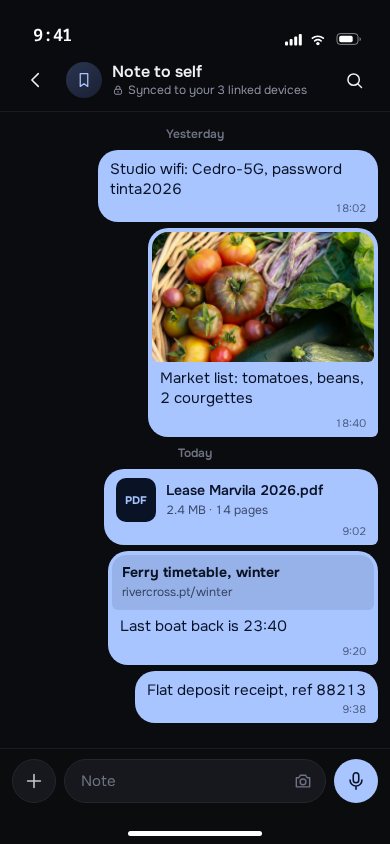
Cipher is a complete private messenger: welcome, phone number and code, a chat list with pinned and sealed chats, a conversation with disappearing messages, safety number verification with a scannable code, contact and group info, a new group, note to self, search, calls with voice and video, stories, linked devices with a pairing scanner, privacy, storage, a supporter plan and settings. Near black and graphite with ice blue bubbles and a mint seal.
| Detail | Value |
|---|---|
| Screen type | List |
| App | Cipher: Encrypted private messenger |
| Category | Social |
| Design language | Dark-first, dark |
| Type | Space Grotesk for headings, Onest for text |
| Colours | #0b0c0f background, #15171c surface, #eef0f4 text, #8b91a1 text-muted, #a8c5ff accent, #0a1226 accent-contrast, #74e3b5 secondary, #20232b border, #ff6b6b danger |
What this screen says
- Note to self
- Synced to your 3 linked devices
- Yesterday
- Studio wifi: Cedro-5G, password tinta2026
- Market list: tomatoes, beans, 2 courgettes
- Today
- Lease Marvila 2026.pdf2.4 MB · 14 pages
- Ferry timetable, winterrivercross.pt/winter
- Last boat back is 23:40
- Flat deposit receipt, ref 88213
- Note
Around it in Cipher
More list and feed screens
- Quorum Comments: Questions and expert answers
- Backer Community: Support creators with memberships
- Pledge Rewards: Back creative projects
- Civic My requests: Report issues and city services
- Guild Messages: Community servers with voice and text chat
- Parrot Calls: Private messaging, groups and calls
- Carrier Channels: Cloud messaging with channels
- Vista Comments: Photos, stories and reels
- Flick Following: Short video feed
- Squawk Topic: Short posts and live conversation
- Agora Comments: Communities, threads and votes
- Spark Likes: Swipe dating
What makes a good list screen
- Show what people need to decide. Each row should carry just enough to choose: a title, one or two details and a status. Everything else belongs on the detail screen.
- Keep rows consistent. The same information in the same place on every row lets people scan down a column instead of reading each item.
- Group with headings. Dates, categories or status headings break long lists into chunks people can skip through.
- Make common actions quick. Swipe actions, a checkbox or a heart on the row save opening the item for small tasks.
The full list screen guide and every example
Remix Cipher free: describe your own app and it is drawn in this design. Or get its files from $10: Figma, React Native, SwiftUI, Flutter and HTML.