Templates · List and feed screens · Social app · Stoop
Stoop Free stuff screen
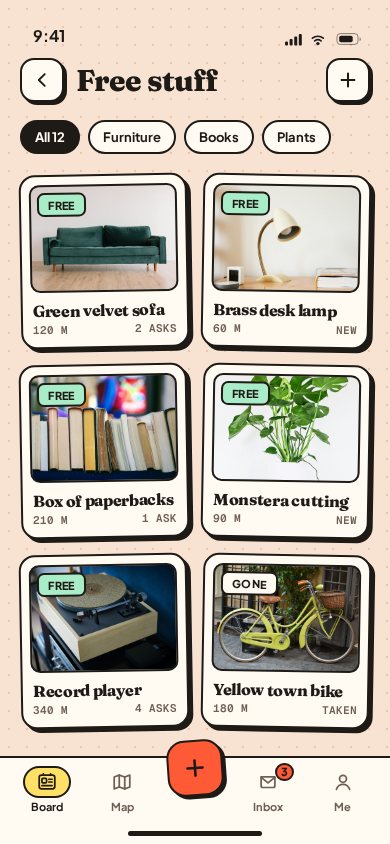
A list screen from Stoop, a neighbourhood noticeboard app template in a Neubrutalism style. Screen 9 of 25.
Stoop is a complete neighbourhood noticeboard: welcome, find your block, sign in and a postcard address check, a cork board home of pinned flyers, search, a block map, a lost cat poster, free stuff with a claim and pickup flow, a new post composer, events with a block party and an RSVP, a shared tool shed, inbox and chat, neighbour profiles, block pulse stats, notifications, a patron plan, profile and settings. Blush brick, ink outlines, pushpin red, canary and door green.
| Detail | Value |
|---|---|
| Screen type | List |
| App | Stoop: Neighbourhood noticeboard |
| Category | Social |
| Design language | Neubrutalism, light |
| Type | Fraunces for headings, Plus Jakarta Sans for text |
| Colours | #f8e3d3 background, #fffaf2 surface, #1e1a16 text, #6e5f55 text-muted, #ff5a36 accent, #1e1a16 accent-contrast, #14624a secondary, #1e1a16 border, #a9edc8 success, #ffe066 warning, #e8432a danger |
What this screen says
- Free stuff
- All 12 Furniture Books Plants
- Free
- Green velvet sofa
- 120 M 2 ASKS
- Brass desk lamp
- 60 M NEW
- Box of paperbacks
- 210 M 1 ASK
- Monstera cutting
- 90 M NEW
- Record player
- 340 M 4 ASKS
- Gone
- Yellow town bike
- 180 M TAKEN
- Board
- Map
- Inbox3
- Me
Around it in Stoop
More list and feed screens
- Murmur Chats: Chat rooms for art lovers
- Wink Likes: Video first dating
- Snoot Places: Social app for pets
- Huddle Notifications: Interest groups and meetups
- Glade Comments: Photo and clip social network
- Onair Notifications: Live streaming
- Drift Comments: Reels and voice rooms
- Glitz Live now: Party live streaming
- Hearth Shared album: Messenger for trips and circles
- Chirp Chat actions: Messenger with file sharing
- Banter New chat: Live messenger
- Natter Start new: Minimal messenger
What makes a good list screen
- Show what people need to decide. Each row should carry just enough to choose: a title, one or two details and a status. Everything else belongs on the detail screen.
- Keep rows consistent. The same information in the same place on every row lets people scan down a column instead of reading each item.
- Group with headings. Dates, categories or status headings break long lists into chunks people can skip through.
- Make common actions quick. Swipe actions, a checkbox or a heart on the row save opening the item for small tasks.
The full list screen guide and every example
Remix Stoop free: describe your own app and it is drawn in this design. Or get its files from $10: Figma, React Native, SwiftUI, Flutter and HTML.