Templates · Detail screens · Lifestyle app · Sillage
Sillage House screen
A detail screen from Sillage, a fragrance wardrobe app template in a Minimal style. Screen 13 of 25.
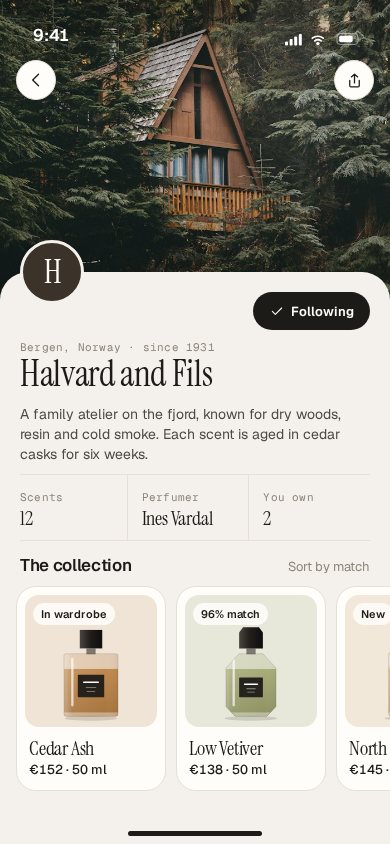
Sillage is a complete fragrance wardrobe: welcome and a scent profile, sign in, a weather aware pick for today, the wardrobe shelf, fragrance pages with a note pyramid, ingredient notes, a live wear tracker with a top, heart and base curve, a wear log and a calendar diary, discover, search, perfume houses, a bottle scanner, adding a bottle with its fill level, layering, insights, discovery sets with a bag and an order confirmation, a wishlist, notifications, Sillage Plus, profile and settings. Vellum, ivory and ink with one burnt amber accent.
| Detail | Value |
|---|---|
| Screen type | Detail |
| App | Sillage: Fragrance wardrobe |
| Category | Lifestyle |
| Design language | Minimal, light |
| Type | Instrument Serif for headings, Geist for text |
| Colours | #f4f1ec background, #fffdfa surface, #1d1b18 text, #8c857b text-muted, #b4532a accent, #fffdfa accent-contrast, #6f7d5c secondary, #e6e0d6 border, #c2412d danger |
What this screen says
- Following
- Bergen, Norway · since 1931
- Halvard and Fils
- A family atelier on the fjord, known for dry woods, resin and cold smoke. Each scent is aged in cedar casks for six...
- Scents 12
- Perfumer Ines Vardal
- You own 2
- The collection
- Sort by match
- In wardrobe
- Cedar Ash
- €152 · 50 ml
- 96% match
- Low Vetiver
- €138 · 50 ml
- New
- North Resin
- €145 · 50 ml
- Sample €6
- Fjord Moss
- €132 · 50 ml
Around it in Sillage
More detail screens
- Specs Frame: Glasses with virtual try-on
- Circuit Product: Electronics store with trade-in and repairs
- Provenance Item: Authenticated luxury resale
- Gavel Lot: Live online auctions
- Tidy Deep clean: Book home cleaners
- Dorm Property: Find student housing
- Hem Quote: Tailoring and alterations, collected
- Lendly Item: Borrow things from neighbours
- Stub Artist: Fan to fan ticket resale
- Trove Idea: Visual ideas and boards
- Vidi Playlist: Video platform for creators
- Roll Photo info: Photo library and backups
Every lifestyle app detail screen
What makes a good detail screen
- Lead with what identifies the item. A large image or title, the price or status, and the key facts at the top. People should know they are in the right place at a glance.
- Keep the main action visible. A sticky bottom button for Add to cart, Book or Play stays reachable while people scroll through details.
- Order information by importance. The facts that decide the choice come first; reviews, specifications and fine print further down.
- Use progressive disclosure. Long descriptions, specifications and policies can expand on tap rather than filling the screen.
The full detail screen guide and every example
Remix Sillage free: describe your own app and it is drawn in this design. Or get its files from $10: Figma, React Native, SwiftUI, Flutter and HTML.