Templates · Form and input screens · Productivity app · Tunnel
Tunnel Double hop screen
A form screen from Tunnel, a VPN and online privacy app template in a Dark-first style. Screen 11 of 25.
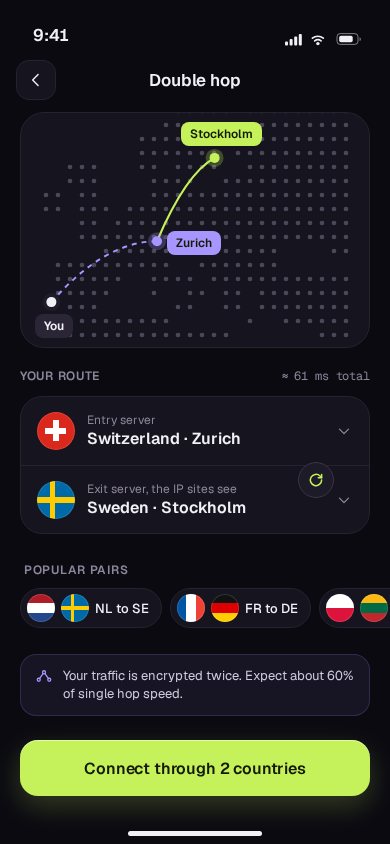
Tunnel is a complete VPN and privacy app: welcome, sign in and VPN permission, a one tap connect home inside a glowing tunnel, the connecting handshake, a dot matrix server map, a country list and a country with its cities, live connection details, specialty servers and double hop, protocols, kill switch, split tunnelling, threat protection with a blocked log, a data breach monitor and a leak, a speed test, plans, checkout and a success screen, notifications, account and settings. Aubergine black and plum graphite with signal lime and lavender.
| Detail | Value |
|---|---|
| Screen type | Form |
| App | Tunnel: VPN and online privacy |
| Category | Productivity |
| Design language | Dark-first, dark |
| Type | Bricolage Grotesque for headings, Geist for text |
| Colours | #0b0a11 background, #16141e surface, #f2f0f7 text, #8d879b text-muted, #c5f25a accent, #141a05 accent-contrast, #a796ff secondary, #26222f border, #ff6b5b danger |
What this screen says
- Double hop
- You Zurich Stockholm
- Your route
- ≈ 61 ms total
- Entry server Switzerland · Zurich
- Exit server, the IP sites see Sweden · Stockholm
- Popular pairs
- NL to SE
- FR to DE
- PL to LT
- Your traffic is encrypted twice. Expect about 60% of single hop speed.
- Connect through 2 countries
Around it in Tunnel
More form and input screens
- Tapline Add link: Link-in-bio pages and analytics
- Quill Insert block: Docs, wikis and databases in one workspace
- Tandem Compose: Team chat, channels and huddles
- Shipyard Comments: Issue tracking for product teams
- Canvas New comment: Design files and comments on mobile
- Merge Review: Code, pull requests and reviews
- Query Research: AI answers with sources
- Glossa New document: Translate text, voice and camera
- Layout Edit text: Design anything from templates
- Tick Quick add: To-do lists and reminders
- Beacon Notify me: Find your devices and people
- Staffroom Request time off: HR, payslips and time off
Every productivity app form screen
What makes a good form screen
- Ask only what you need. Every field is a reason to stop. Remove optional fields or move them to later.
- Labels above fields. Visible labels stay readable while people type; placeholder-only labels disappear.
- Use the right keyboard and input. Number pads for amounts, email keyboards for email, pickers for dates and autofill for addresses and codes.
- Validate as people go. Show problems next to the field when people leave it, in words that say how to fix them.
The full form screen guide and every example
Remix Tunnel free: describe your own app and it is drawn in this design. Or get its files from $10: Figma, React Native, SwiftUI, Flutter and HTML.