Templates · Detail screens · Lifestyle app · Shelf
Shelf Meeting screen
A detail screen from Shelf, a reading tracker and book club app template in a Minimal style. Screen 22 of 25.
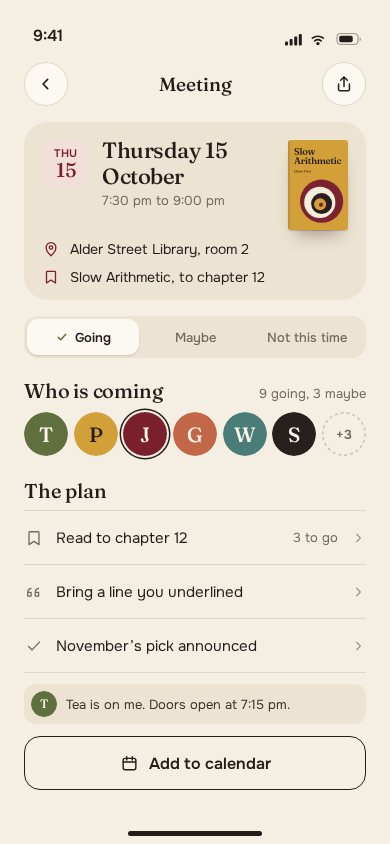
Shelf is a complete reading tracker and book club: onboarding with a yearly goal, a home with the book in hand, book pages, logging pages, a reading timer, finishing and reviewing, shelves drawn as rows of spines, search, a reading goal, the year in books, saved quotes, a club with discussion by chapter, voting on the next pick, meetings, a plan, profile and settings. Warm paper with oxblood, moss and Fraunces.
| Detail | Value |
|---|---|
| Screen type | Detail |
| App | Shelf: Reading tracker and book club |
| Category | Lifestyle |
| Design language | Minimal, light |
| Type | Onest |
| Colours | #f5efe3 background, #fcf9f2 surface, #231c18 text, #75695d text-muted, #7a1f2b accent, #fcf6ea accent-contrast, #5f6f3e secondary, #e0d6c3 border, #b3402e danger |
What this screen says
- Meeting
- Thu15
- Thursday 15 October
- 7:30 pm to 9:00 pm
- Alder Street Library, room 2
- Slow Arithmetic, to chapter 12
- Going Maybe Not this time
- Who is coming
- 9 going, 3 maybe
- The plan
- Read to chapter 12
- 3 to go
- Bring a line you underlined
- November’s pick announced
- Tea is on me. Doors open at 7:15 pm.
- Add to calendar
Around it in Shelf
More detail screens
- Guardrail Child: Parental controls and screen time
- Collar Escape alert: GPS pet tracker
- Postage Item: Send parcels and find drop-off points
- Specs Frame: Glasses with virtual try-on
- Circuit Product: Electronics store with trade-in and repairs
- Provenance Item: Authenticated luxury resale
- Gavel Lot: Live online auctions
- Tidy Deep clean: Book home cleaners
- Dorm Property: Find student housing
- Hem Quote: Tailoring and alterations, collected
- Lendly Item: Borrow things from neighbours
- Stub Artist: Fan to fan ticket resale
Every lifestyle app detail screen
What makes a good detail screen
- Lead with what identifies the item. A large image or title, the price or status, and the key facts at the top. People should know they are in the right place at a glance.
- Keep the main action visible. A sticky bottom button for Add to cart, Book or Play stays reachable while people scroll through details.
- Order information by importance. The facts that decide the choice come first; reviews, specifications and fine print further down.
- Use progressive disclosure. Long descriptions, specifications and policies can expand on tap rather than filling the screen.
The full detail screen guide and every example
Remix Shelf free: describe your own app and it is drawn in this design. Or get its files from $10: Figma, React Native, SwiftUI, Flutter and HTML.