Templates · Form and input screens · Productivity app · Sheet
Sheet Share screen
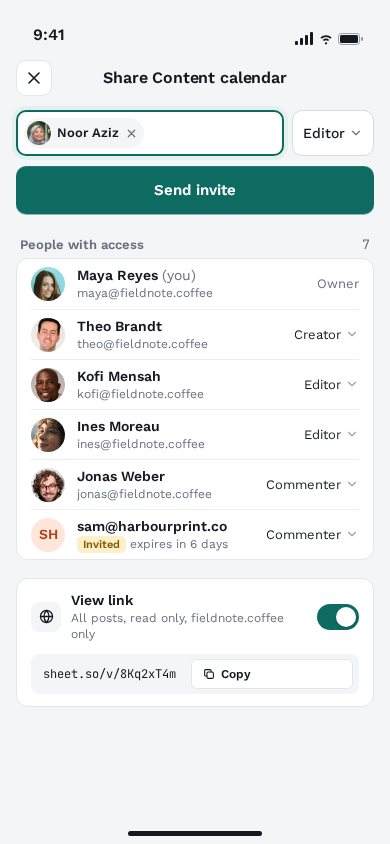
A form screen from Sheet, a spreadsheets and databases app template in an Enterprise style. Screen 19 of 25.
Sheet is a complete team database and spreadsheet app: welcome, sign in with SSO, starting a base from a template, a home of starred and recent bases, a base with its tables and views, a dense grid with typed fields and a frozen first column, an expanded record, adding a field, a formula editor, filters and sort, kanban and calendar views, a request form with its confirmation, search, record activity, a summary dashboard, a classic budget sheet with a formula bar, sharing, automations and an automation builder, a team plan, inbox, account and settings. Cool grey and white with deep spruce, saffron and pastel select tags.
| Detail | Value |
|---|---|
| Screen type | Form |
| App | Sheet: Spreadsheets and databases |
| Category | Productivity |
| Design language | Enterprise, light |
| Type | JetBrains Mono for headings, Work Sans for text |
| Colours | #f4f5f7 background, #ffffff surface, #141821 text, #666e7f text-muted, #0d6b62 accent, #ffffff accent-contrast, #f6b23c secondary, #e3e6eb border, #d6453d danger |
What this screen says
- Share Content calendar
- Noor Aziz
- Editor
- Send invite
- People with access 7
- Maya Reyes (you)
- maya@fieldnote.coffee
- Owner
- Theo Brandt
- theo@fieldnote.coffee
- Creator
- Kofi Mensah
- kofi@fieldnote.coffee
- Ines Moreau
- ines@fieldnote.coffee
- Jonas Weber
- jonas@fieldnote.coffee
- Commenter
- SH
- sam@harbourprint.co
- Invited expires in 6 days
- View link
- All posts, read only, fieldnote.coffee only
- sheet.so/v/8Kq2xT4m Copy
Around it in Sheet
More form and input screens
- Staffroom Request time off: HR, payslips and time off
- Slot New event type: Booking links and meeting scheduling
- Tunnel Double hop: VPN and online privacy
- Ping Report issue: Internet speed test
- Glance Price alert: Visual search with the camera
- Replay New recording: Record and share screen videos
- Easel Workspace: Collaborative whiteboard
- Token Add account: Two-factor codes and sign-in approvals
- Beam Pick files: Send big files
- Parchment Text style: Documents, edit and share
- Lectern Format: Slides and presenter remote
- Ringer New contact: Phone, contacts and voicemail
Every productivity app form screen
What makes a good form screen
- Ask only what you need. Every field is a reason to stop. Remove optional fields or move them to later.
- Labels above fields. Visible labels stay readable while people type; placeholder-only labels disappear.
- Use the right keyboard and input. Number pads for amounts, email keyboards for email, pickers for dates and autofill for addresses and codes.
- Validate as people go. Show problems next to the field when people leave it, in words that say how to fix them.
The full form screen guide and every example
Remix Sheet free: describe your own app and it is drawn in this design. Or get its files from $10: Figma, React Native, SwiftUI, Flutter and HTML.