Templates · Detail screens · Productivity app · Sheet
Sheet Budget sheet screen
A detail screen from Sheet, a spreadsheets and databases app template in an Enterprise style. Screen 18 of 25.
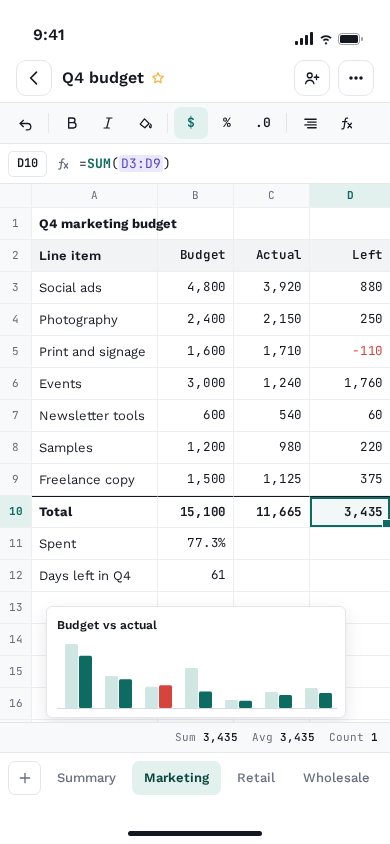
Sheet is a complete team database and spreadsheet app: welcome, sign in with SSO, starting a base from a template, a home of starred and recent bases, a base with its tables and views, a dense grid with typed fields and a frozen first column, an expanded record, adding a field, a formula editor, filters and sort, kanban and calendar views, a request form with its confirmation, search, record activity, a summary dashboard, a classic budget sheet with a formula bar, sharing, automations and an automation builder, a team plan, inbox, account and settings. Cool grey and white with deep spruce, saffron and pastel select tags.
| Detail | Value |
|---|---|
| Screen type | Detail |
| App | Sheet: Spreadsheets and databases |
| Category | Productivity |
| Design language | Enterprise, light |
| Type | JetBrains Mono for headings, Work Sans for text |
| Colours | #f4f5f7 background, #ffffff surface, #141821 text, #666e7f text-muted, #0d6b62 accent, #ffffff accent-contrast, #f6b23c secondary, #e3e6eb border, #d6453d danger |
What this screen says
- Q4 budget
- D10 =SUM(D3:D9)
- A B C D
- 1 Q4 marketing budget
- 2 Line item Budget Actual Left
- 3 Social ads 4,800 3,920 880
- 4 Photography 2,400 2,150 250
- 5 Print and signage 1,600 1,710 -110
- 6 Events 3,000 1,240 1,760
- 7 Newsletter tools 600 540 60
- 8 Samples 1,200 980 220
- 9 Freelance copy 1,500 1,125 375
- 10 Total 15,100 11,665 3,435
- 11 Spent 77.3%
- 12 Days left in Q4 61
- Budget vs actual
- Sum 3,435 Avg 3,435 Count 1
- Summary Marketing Retail Wholesale
Around it in Sheet
More detail screens
- Keyring Login: Password manager
- Rota Shift detail: Shift scheduling for hourly teams
- Inkwell Entry: Daily journal
- Shortlist Job: Job search and application tracker
- Parley Chat: Team messenger
- Docket Task: Task and sprint planner
- Kanso Project: Tasks, calendar and chat
- Margin Notebook: AI note taking
- Aide Meeting brief: Executive AI assistant
- Juno Chat: AI chat assistant
- Opal Project: Studio dashboard
- Jot Note: Quick notes and checklists
Every productivity app detail screen
What makes a good detail screen
- Lead with what identifies the item. A large image or title, the price or status, and the key facts at the top. People should know they are in the right place at a glance.
- Keep the main action visible. A sticky bottom button for Add to cart, Book or Play stays reachable while people scroll through details.
- Order information by importance. The facts that decide the choice come first; reviews, specifications and fine print further down.
- Use progressive disclosure. Long descriptions, specifications and policies can expand on tap rather than filling the screen.
The full detail screen guide and every example
Remix Sheet free: describe your own app and it is drawn in this design. Or get its files from $10: Figma, React Native, SwiftUI, Flutter and HTML.