Templates · Home screens · Fitness app · Segment
Segment Home screen
A home screen from Segment, a runs and rides with friends app template in a Minimal style. Screen 4 of 25.
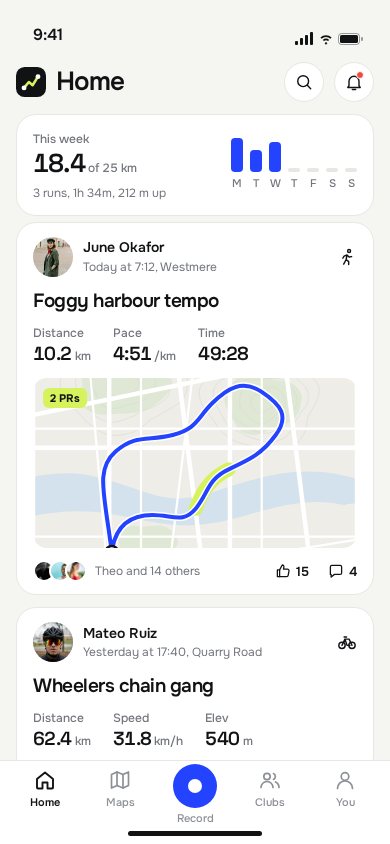
Segment is a complete social running and riding app: welcome, sports and weekly goal, sign in, a friends feed with route maps, an activity with splits and segments, cheers and comments, a route replay, segment leaderboards, a segment map, search, saved routes and a route planner, recording with live stats and segment alerts, saving a run and its PRs, progress, clubs, a club page, joining a group run, challenges, notifications, a Plus plan, profile and settings. Paper and white with ink, cobalt and a chartreuse highlight.
| Detail | Value |
|---|---|
| Screen type | Home |
| App | Segment: Runs and rides with friends |
| Category | Health and fitness |
| Design language | Minimal, light |
| Type | Space Grotesk for headings, Onest for text |
| Colours | #f5f5f2 background, #ffffff surface, #111214 text, #74777e text-muted, #2443ff accent, #ffffff accent-contrast, #d6f25c secondary, #e8e7e2 border, #ef4a3c danger |
What this screen says
- Home
- This week18.4of 25 km
- 3 runs, 1h 34m, 212 m up
- M T W T F S S
- June OkaforToday at 7:12, Westmere
- Foggy harbour tempo
- Distance10.2km
- Pace4:51/km
- Time49:28
- 2 PRs
- Theo and 14 others
- Mateo RuizYesterday at 17:40, Quarry Road
- Wheelers chain gang
- Distance62.4km
- Speed31.8km/h
- Elev540m
- Maps
- Record
- Clubs
- You
Around it in Segment
More home screens
- Morsel Home: AI calorie tracker
- Dew Home: AI skin scan and routine
- Cradle Home: Baby tracker
- Medly Home: Doctor on call
- Donor Home: Blood donation, counted drop by drop
- Unfold Home: Yoga and stretching
- Kilo Home: Strength training log
- Cyra Today: Cycle tracker
- Harbor Home: Therapy and mood
- Fasten Home: Intermittent fasting
- Plate Today: Calorie and macro tracker
- Vita Home: Personal health record
What makes a good home screen
- Put the most important thing first. Decide the one thing most people come for, like today's workout, a balance or the next booking, and give it the top of the screen.
- Make it feel current. Greetings with the time of day, today's date, fresh numbers and recent activity tell people the app is alive and about them.
- Keep quick actions within thumb reach. The two or three things people do most should be one tap away, in the lower part of the screen or a floating button.
- Group related content in clear sections. Use headings and spacing so the screen scans as a few blocks, not a long mixed list.
The full home screen guide and every example
Remix Segment free: describe your own app and it is drawn in this design. Or get its files from $10: Figma, React Native, SwiftUI, Flutter and HTML.