Templates · Home screens · Fitness app · Harbor
Harbor Home screen
A home screen from Harbor, a therapy and mood app template in a Minimal style. Screen 5 of 25.
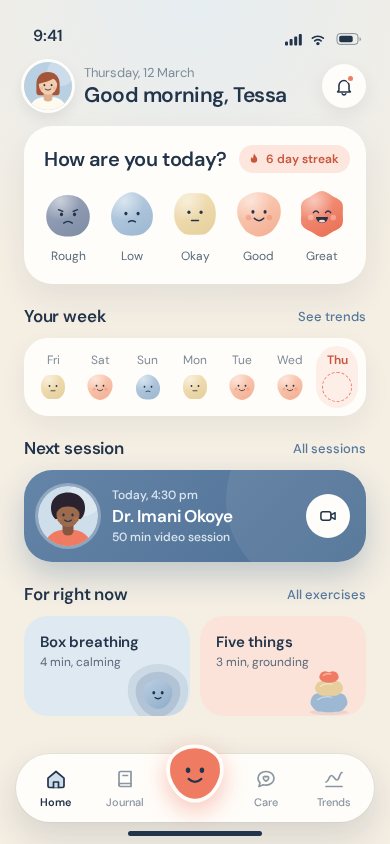
Harbor is a complete therapy and mood app: welcome, sign in, a passcode and first goals, a home that asks how you are, a two step mood check in, a journal with entries and prompts, mood trends with what lifts and weighs on you, therapist matching, a therapist page, booking and a video session, calming exercises with a breathing timer, crisis help, a Plus plan, notifications, profile and settings. Everything is drawn: five mood blobs with faces, soft portraits and a small boat in a harbour.
| Detail | Value |
|---|---|
| Screen type | Home |
| App | Harbor: Therapy and mood |
| Category | Health and fitness |
| Design language | Minimal, light |
| Type | DM Sans |
| Colours | #f4eee3 background, #fffdf9 surface, #22344a text, #7f8c99 text-muted, #55789c accent, #ffffff accent-contrast, #ee7b62 secondary, #e8dfd0 border, #cf4f3c danger |
What this screen says
- Thursday, 12 March
- Good morning, Tessa
- How are you today?
- 6 day streak
- Rough
- Low
- Okay
- Good
- Great
- Your week
- See trends
- Fri
- Sat
- Sun
- Mon
- Tue
- Wed
- Thu
- Next session
- All sessions
- Today, 4:30 pm
- Dr. Imani Okoye
- 50 min video session
- For right now
- All exercises
- Box breathing
- 4 min, calming
- Five things
- 3 min, grounding
- Home
Around it in Harbor
More home screens
- Forge Home: AI fitness and nutrition
- Lull Home: Sleep sounds and meditation
- Pace Home: Fitness tracker
- Flexpass Home: One membership, many studios
- Clinic Home: Find and book doctors
- Careline Today: Care for an ageing parent
- Velo Home: Live and on-demand indoor cycling
- Vantage My day: Sports watch companion
- Labwork Home: Book blood tests and see results
- Segment Home: Runs and rides with friends
- Nightly Today: Smart ring sleep and readiness
- Pillbox Today: Pharmacy refills and medicine reminders
What makes a good home screen
- Put the most important thing first. Decide the one thing most people come for, like today's workout, a balance or the next booking, and give it the top of the screen.
- Make it feel current. Greetings with the time of day, today's date, fresh numbers and recent activity tell people the app is alive and about them.
- Keep quick actions within thumb reach. The two or three things people do most should be one tap away, in the lower part of the screen or a floating button.
- Group related content in clear sections. Use headings and spacing so the screen scans as a few blocks, not a long mixed list.
The full home screen guide and every example
Remix Harbor free: describe your own app and it is drawn in this design. Or get its files from $10: Figma, React Native, SwiftUI, Flutter and HTML.