Templates · Home screens · Lifestyle app · Scrapbook
Scrapbook Home screen
A home screen from Scrapbook, a digital scrapbook journal app template in a Gen Z style. Screen 4 of 25.
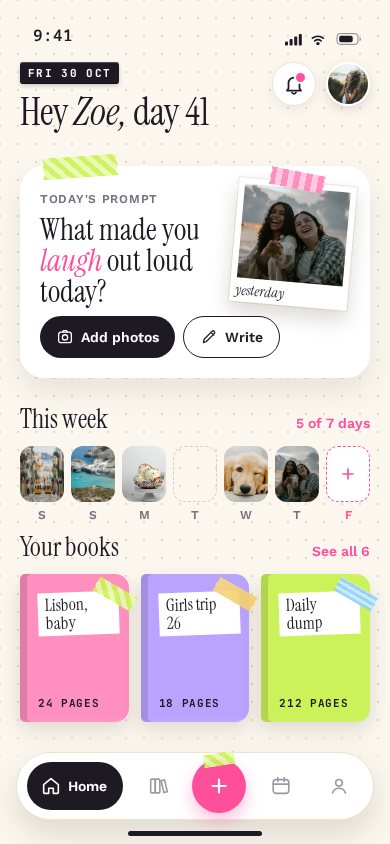
Scrapbook is a complete scrapbook journal: welcome, a vibe picker and sign in, a home with today's prompt and the week in tiny photos, a shelf of books, a book and a finished page, a collage editor with a sticker drawer, a photo picker and a note with mood and place, a saved page, search, a calendar of pages, on this day, a year recap, a shared book with friends, a sticker pack, a printed zine with checkout, an order placed and tracked, a Club plan, notifications, profile and settings. Every page is paper, tape and polaroids.
| Detail | Value |
|---|---|
| Screen type | Home |
| App | Scrapbook: Digital scrapbook journal |
| Category | Lifestyle |
| Design language | Gen Z, light |
| Type | Instrument Serif for headings, Work Sans for text |
| Colours | #fbf7ef background, #ffffff surface, #1d1a24 text, #77707f text-muted, #ff4f9a accent, #ffffff accent-contrast, #cbf259 secondary, #ece3d3 border, #e8443a danger |
What this screen says
- Fri 30 Oct
- Hey Zoe, day 41
- Today's prompt
- What made you laugh out loud today?
- yesterday
- Add photos Write
- This week
- 5 of 7 days
- Your books
- See all 6
- Lisbon, baby24 PAGES
- Girls trip 2618 PAGES
- Daily dump212 PAGES
- Home Books Calendar Me
Around it in Scrapbook
More home screens
- Tasker Home: Book and do local odd jobs
- Toolbox Home: Hardware store and project lists
- Brief Feed: News in sixty words
- Kibble Home: Pet supplies and autoship
- Filmlog Home: Film diary and reviews
- Guardrail Family: Parental controls and screen time
- Collar Map: GPS pet tracker
- Postage Home: Send parcels and find drop-off points
- Specs Shop: Glasses with virtual try-on
- Circuit Home: Electronics store with trade-in and repairs
- Provenance Shop: Authenticated luxury resale
- Gavel Home: Live online auctions
Every lifestyle app home screen
What makes a good home screen
- Put the most important thing first. Decide the one thing most people come for, like today's workout, a balance or the next booking, and give it the top of the screen.
- Make it feel current. Greetings with the time of day, today's date, fresh numbers and recent activity tell people the app is alive and about them.
- Keep quick actions within thumb reach. The two or three things people do most should be one tap away, in the lower part of the screen or a floating button.
- Group related content in clear sections. Use headings and spacing so the screen scans as a few blocks, not a long mixed list.
The full home screen guide and every example
Remix Scrapbook free: describe your own app and it is drawn in this design. Or get its files from $10: Figma, React Native, SwiftUI, Flutter and HTML.