Templates · List and feed screens · Productivity app · Rota
Rota Swap requests screen
A list screen from Rota, a shift scheduling for hourly teams app template in an Enterprise style. Screen 14 of 25.
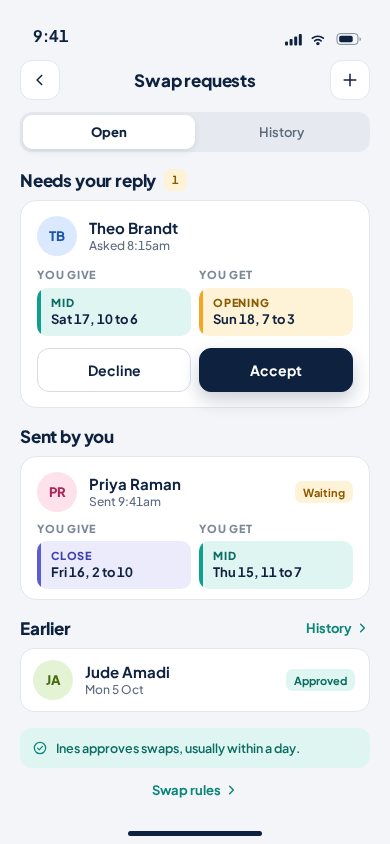
Rota is a complete workforce app for people paid by the hour: welcome, sign in, joining a team with a code, a home with the live shift, the week as colour coded shift blocks, shift detail, clocking in on site with breaks and a shift summary, open shifts, swap requests, availability and time off, a timesheet table with entry fixes, a pay estimate and payslip, the team rota, teammates, notifications, profile and settings. Opening, mid and close shifts keep their own colour on every screen.
| Detail | Value |
|---|---|
| Screen type | List |
| App | Rota: Shift scheduling for hourly teams |
| Category | Productivity |
| Design language | Enterprise, light |
| Type | Plus Jakarta Sans |
| Colours | #f3f5f8 background, #ffffff surface, #0e2240 text, #5d6b7e text-muted, #0b8577 accent, #ffffff accent-contrast, #f5a524 secondary, #e2e7ee border, #d9453c danger |
What this screen says
- Swap requests
- Open History
- Needs your reply1
- TB
- Theo Brandt
- Asked 8:15am
- You give You get
- Mid
- Sat 17, 10 to 6
- Opening
- Sun 18, 7 to 3
- Decline
- Accept
- Sent by you
- PR
- Priya Raman
- Sent 9:41am
- Waiting
- Close
- Fri 16, 2 to 10
- Thu 15, 11 to 7
- Earlier
- History
- JA
- Jude Amadi
- Mon 5 Oct
- Approved
- Ines approves swaps, usually within a day.
- Swap rules
Around it in Rota
More list and feed screens
- Merge Inbox: Code, pull requests and reviews
- Query Sources: AI answers with sources
- Glossa History: Translate text, voice and camera
- Layout Uploads: Design anything from templates
- Tick Inbox: To-do lists and reminders
- Beacon Devices: Find your devices and people
- Staffroom Inbox: HR, payslips and time off
- Slot Calendar: Booking links and meeting scheduling
- Sheet Base: Spreadsheets and databases
- Tunnel Specialty servers: VPN and online privacy
- Ping History: Internet speed test
- Glance History: Visual search with the camera
Every productivity app list screen
What makes a good list screen
- Show what people need to decide. Each row should carry just enough to choose: a title, one or two details and a status. Everything else belongs on the detail screen.
- Keep rows consistent. The same information in the same place on every row lets people scan down a column instead of reading each item.
- Group with headings. Dates, categories or status headings break long lists into chunks people can skip through.
- Make common actions quick. Swipe actions, a checkbox or a heart on the row save opening the item for small tasks.
The full list screen guide and every example
Remix Rota free: describe your own app and it is drawn in this design. Or get its files from $10: Figma, React Native, SwiftUI, Flutter and HTML.