Templates · Success and confirmation screens · Productivity app · Ringer
Ringer Number blocked screen
A success screen from Ringer, a productivity app template in a Minimal style. Screen 21 of 25.
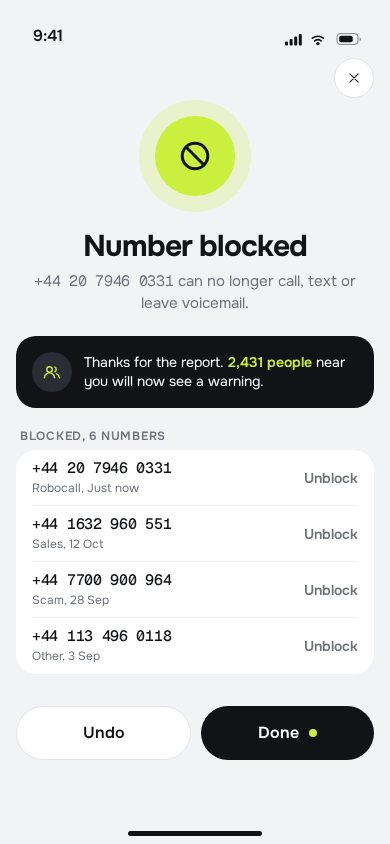
Ringer is a complete phone app: welcome, permissions, sign in with a texted code, favourites, recents with missed calls and filtered spam, call details, contacts with an alphabet index, a contact card, a new contact form, search across people and voicemail, a keypad, an incoming call, the in-call screen, a call recording consent sheet and a call summary, visual voicemail with a live transcript, a spam filter, blocking a number with a confirmation, call stats, a Plus plan, my card and settings. Porcelain and white with ink, signal lime and a coral for missed and declined calls.
| Detail | Value |
|---|---|
| Screen type | Success |
| App | Ringer: Phone, contacts and voicemail |
| Category | Productivity |
| Design language | Minimal, light |
| Type | Onest |
| Colours | #f2f3f5 background, #ffffff surface, #111316 text, #6e737c text-muted, #c8f03c accent, #111316 accent-contrast, #1b1d21 secondary, #e3e5e9 border, #f2473a danger, #b26f00 warning |
What this screen says
- Number blocked
- +44 20 7946 0331 can no longer call, text or leave voicemail.
- Thanks for the report. 2,431 people near you will now see a warning.
- Blocked, 6 numbers
- Robocall, Just now
- Unblock
- Sales, 12 Oct
- Scam, 28 Sep
- Other, 3 Sep
- Undo
- Done
Around it in Ringer
More success and confirmation screens
- Aide Session complete: Executive AI assistant
- Juno Subscribed: AI chat assistant
- Opal Invoice sent: Studio dashboard
- Jot Invite sent: Quick notes and checklists
- Chrono Invite sent: World clock, timers and stopwatch
- Frontdesk Solved: Customer support inbox
- Campaign Scheduled: Email marketing campaigns
- Outpost Scheduled: Schedule social posts
- Pageview Alert saved: Website analytics
- Polish Upgraded: Writing assistant and keyboard
- Tapline Tip sent: Link-in-bio pages and analytics
- Quill Upgraded: Docs, wikis and databases in one workspace
Every productivity app success screen
What makes a good confirmation screen
- Confirm in the headline. "Payment sent", "Table booked for Friday at 8" or "Lesson complete" in plain words, with a clear success colour or icon.
- Repeat the key details. Amount, date, reference number or score, so people do not need to check elsewhere that the right thing happened.
- Say what happens next. When the order arrives, when the money lands, when the next lesson unlocks.
- Offer the next step. Track the order, add to calendar, share, or start the next lesson. One primary action and a way back home.
The full confirmation screen guide and every example
Remix Ringer free: describe your own app and it is drawn in this design. Or get its files from $10: Figma, React Native, SwiftUI, Flutter and HTML.