Templates · Paywall screens · Fitness app · Reformer
Reformer Class packs screen
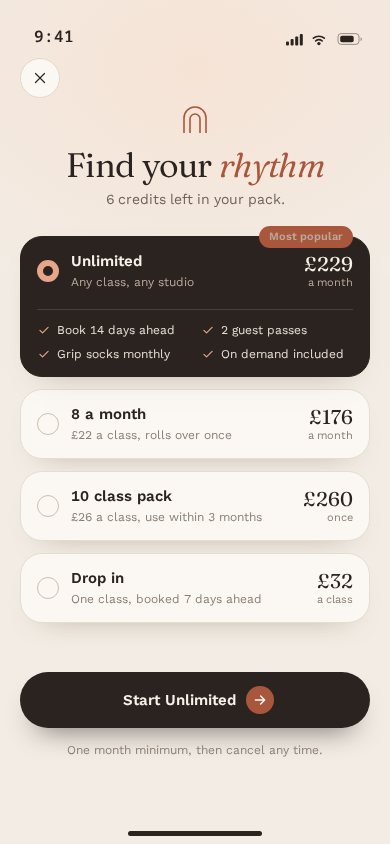
A paywall screen from Reformer, a pilates studio booking app template in a Luxury style. Screen 21 of 25.
Reformer is a complete Pilates studio app: welcome, choosing your practice, sign in, a today screen with your next class in an arch, the weekly schedule, search, a class page with its spring settings, choosing your reformer on a drawn floor plan of the room, booking with pack credits, a confirmation, your bookings, a check in pass, a live in class screen with the carriage track, teachers, a studio page, progress, rating a class, on demand videos with a player, class packs, notifications, a private session form, profile and settings. Oat plaster, espresso and terracotta clay.
| Detail | Value |
|---|---|
| Screen type | Paywall |
| App | Reformer: Pilates studio booking |
| Category | Health and fitness |
| Design language | Luxury, light |
| Type | Fraunces for headings, Work Sans for text |
| Colours | #f2ece4 background, #fbf8f3 surface, #2b2320 text, #8a7d72 text-muted, #a9573c accent, #fbf8f3 accent-contrast, #ead8ca secondary, #e3d9cd border, #b2412f danger |
What this screen says
- Find your rhythm
- 6 credits left in your pack.
- Most popular
- UnlimitedAny class, any studio
- £229a month
- Book 14 days ahead
- 2 guest passes
- Grip socks monthly
- On demand included
- 8 a month£22 a class, rolls over once
- £176a month
- 10 class pack£26 a class, use within 3 months
- £260once
- Drop inOne class, booked 7 days ahead
- £32a class
- Start Unlimited
- One month minimum, then cancel any time.
Around it in Reformer
More paywall screens
- Cyra Plus: Cycle tracker
- Harbor Plus: Therapy and mood
- Fasten Plus: Intermittent fasting
- Plate Plus: Calorie and macro tracker
- Vita Plus: Personal health record
- Forge Pro: AI fitness and nutrition
- Lull Premium: Sleep sounds and meditation
- Pace Pro: Fitness tracker
- Flexpass Plans: One membership, many studios
- Clinic Plus: Find and book doctors
- Careline Plus: Care for an ageing parent
- Velo Membership: Live and on-demand indoor cycling
Every fitness app paywall screen
What makes a good paywall screen
- Lead with the outcome, not the feature list. The headline should say what changes for the person: "Train smarter every week" beats "Unlock Premium". Three to five benefits underneath are enough; more turns into a wall of ticks nobody reads.
- Show the real price, period and trial terms. State the price, how often it renews and when a free trial turns into a charge, near the button. Apple's App Store guideline 3.1.2 asks subscription apps to make this clear before purchase, and Google Play has similar rules.
- One primary button. The main call to action should be impossible to miss and say what happens: "Start 7-day free trial" or "Subscribe for $4.99/month". A second plan choice is fine; a second competing button is not.
- Make the plans easy to compare. When you offer monthly and yearly, show both prices in the same unit (per month or per week) and mark the saving on the yearly plan in plain numbers, not just a badge.
The full paywall screen guide and every example
Remix Reformer free: describe your own app and it is drawn in this design. Or get its files from $10: Figma, React Native, SwiftUI, Flutter and HTML.