Templates · Player, camera and editor screens · Fitness app · Reformer
Reformer Video screen
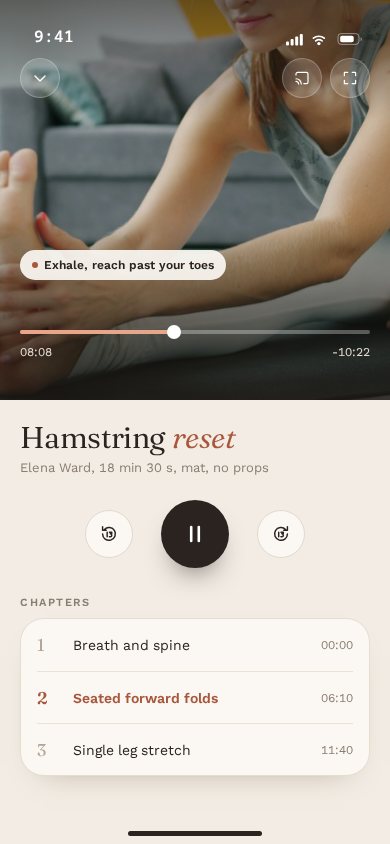
A media screen from Reformer, a pilates studio booking app template in a Luxury style. Screen 20 of 25.
Reformer is a complete Pilates studio app: welcome, choosing your practice, sign in, a today screen with your next class in an arch, the weekly schedule, search, a class page with its spring settings, choosing your reformer on a drawn floor plan of the room, booking with pack credits, a confirmation, your bookings, a check in pass, a live in class screen with the carriage track, teachers, a studio page, progress, rating a class, on demand videos with a player, class packs, notifications, a private session form, profile and settings. Oat plaster, espresso and terracotta clay.
| Detail | Value |
|---|---|
| Screen type | Media |
| App | Reformer: Pilates studio booking |
| Category | Health and fitness |
| Design language | Luxury, light |
| Type | Fraunces for headings, Work Sans for text |
| Colours | #f2ece4 background, #fbf8f3 surface, #2b2320 text, #8a7d72 text-muted, #a9573c accent, #fbf8f3 accent-contrast, #ead8ca secondary, #e3d9cd border, #b2412f danger |
What this screen says
- Exhale, reach past your toes
- Hamstring reset
- Elena Ward, 18 min 30 s, mat, no props
- Chapters
- 1Breath and spine 00:00
- 2Seated forward folds 06:10
- 3Single leg stretch 11:40
Around it in Reformer
More player, camera and editor screens
- Jab Class video: Boxing workouts with a smart bag
- Exhale HRV check: Breathwork sessions
- Bump Scan: Pregnancy week by week
- Morsel Scan: AI calorie tracker
- Dew Camera: AI skin scan and routine
- Medly Video visit: Doctor on call
- Unfold Player: Yoga and stretching
- Harbor Video session: Therapy and mood
- Plate Scan barcode: Calorie and macro tracker
- Vita Scan a report: Personal health record
- Forge Scan food: AI fitness and nutrition
- Lull Player: Sleep sounds and meditation
Every fitness app media screen
What makes a good media player screen
- Content takes the space. Artwork, video or the camera view should fill most of the screen.
- Primary controls in the thumb zone. Play and pause, the shutter or the main tool, large and low on the screen.
- Show progress and position. A scrubber with elapsed and remaining time, or the step in a lesson.
- Hide secondary controls until needed. Lyrics, queue, filters and advanced tools can live behind a tap or a swipe.
The full media player screen guide and every example
Remix Reformer free: describe your own app and it is drawn in this design. Or get its files from $10: Figma, React Native, SwiftUI, Flutter and HTML.