Templates · Paywall screens · Fitness app · Pace
Pace Pro screen
A paywall screen from Pace, a fitness tracker app template in a Playful style. Screen 18 of 21.
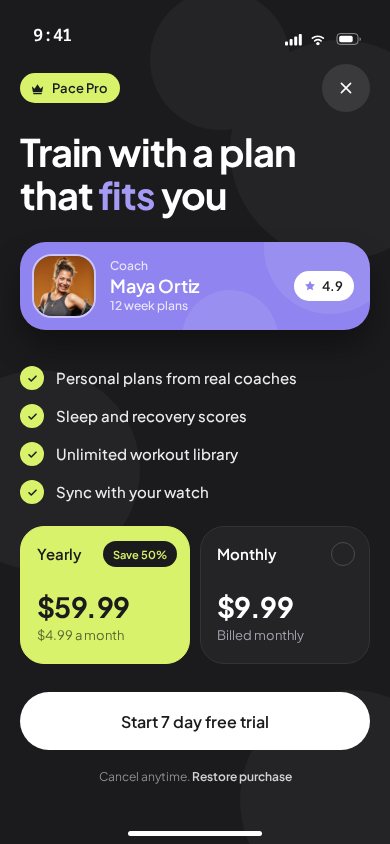
Pace is a complete fitness app: onboarding, sign in, goals, a health overview home, workouts, a guided exercise player, a finish screen, activity and steps, heart rate, sleep, a tracked run on a map, nutrition, programs, a weekly schedule, challenges, a Pro paywall, profile and settings. Lavender and acid lime over black and white, with big numbers and soft rounded cards.
| Detail | Value |
|---|---|
| Screen type | Paywall |
| App | Pace: Fitness tracker |
| Category | Health and fitness |
| Design language | Playful, light |
| Type | Plus Jakarta Sans |
| Colours | #f4f4f7 background, #ffffff surface, #1b1b1d text, #8e8e99 text-muted, #8f84f0 accent, #ffffff accent-contrast, #d8f36b secondary, #ececf1 border, #ff5d6c danger |
What this screen says
- Pace Pro
- Train with a plan
- that fits you
- Coach Maya Ortiz12 week plans
- Personal plans from real coaches
- Sleep and recovery scores
- Unlimited workout library
- Sync with your watch
- Yearly
- Save 50%
- $4.99 a month
- Monthly
- Billed monthly
- Start 7 day free trial
- Cancel anytime. Restore purchase
Around it in Pace
More paywall screens
- Fasten Plus: Intermittent fasting
- Plate Plus: Calorie and macro tracker
- Vita Plus: Personal health record
- Forge Pro: AI fitness and nutrition
- Lull Premium: Sleep sounds and meditation
- Flexpass Plans: One membership, many studios
- Clinic Plus: Find and book doctors
- Careline Plus: Care for an ageing parent
- Velo Membership: Live and on-demand indoor cycling
- Vantage Pro: Sports watch companion
- Labwork Retest plans: Book blood tests and see results
- Segment Plus: Runs and rides with friends
Every fitness app paywall screen
What makes a good paywall screen
- Lead with the outcome, not the feature list. The headline should say what changes for the person: "Train smarter every week" beats "Unlock Premium". Three to five benefits underneath are enough; more turns into a wall of ticks nobody reads.
- Show the real price, period and trial terms. State the price, how often it renews and when a free trial turns into a charge, near the button. Apple's App Store guideline 3.1.2 asks subscription apps to make this clear before purchase, and Google Play has similar rules.
- One primary button. The main call to action should be impossible to miss and say what happens: "Start 7-day free trial" or "Subscribe for $4.99/month". A second plan choice is fine; a second competing button is not.
- Make the plans easy to compare. When you offer monthly and yearly, show both prices in the same unit (per month or per week) and mark the saving on the yearly plan in plain numbers, not just a badge.
The full paywall screen guide and every example
Remix Pace free: describe your own app and it is drawn in this design. Or get its files from $10: Figma, React Native, SwiftUI, Flutter and HTML.