Templates · Booking and checkout screens · Fitness app · Reformer
Reformer Confirm booking screen
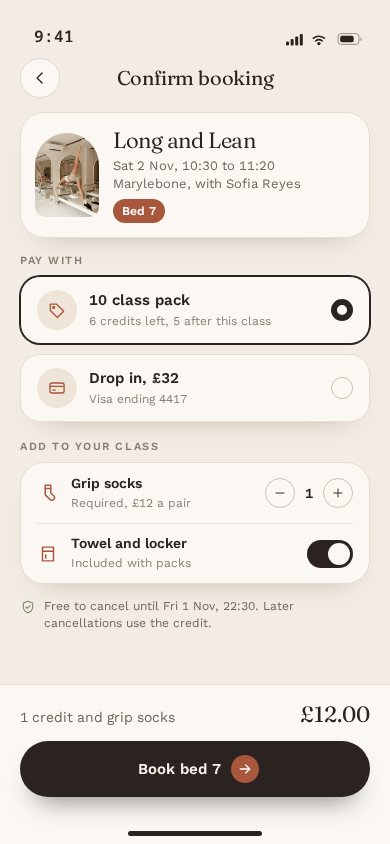
A checkout screen from Reformer, a pilates studio booking app template in a Luxury style. Screen 9 of 25.
Reformer is a complete Pilates studio app: welcome, choosing your practice, sign in, a today screen with your next class in an arch, the weekly schedule, search, a class page with its spring settings, choosing your reformer on a drawn floor plan of the room, booking with pack credits, a confirmation, your bookings, a check in pass, a live in class screen with the carriage track, teachers, a studio page, progress, rating a class, on demand videos with a player, class packs, notifications, a private session form, profile and settings. Oat plaster, espresso and terracotta clay.
| Detail | Value |
|---|---|
| Screen type | Checkout |
| App | Reformer: Pilates studio booking |
| Category | Health and fitness |
| Design language | Luxury, light |
| Type | Fraunces for headings, Work Sans for text |
| Colours | #f2ece4 background, #fbf8f3 surface, #2b2320 text, #8a7d72 text-muted, #a9573c accent, #fbf8f3 accent-contrast, #ead8ca secondary, #e3d9cd border, #b2412f danger |
What this screen says
- Confirm booking
- Long and Lean
- Sat 2 Nov, 10:30 to 11:20
- Marylebone, with Sofia Reyes
- Bed 7
- Pay with
- 10 class pack6 credits left, 5 after this class
- Drop in, £32Visa ending 4417
- Add to your class
- Grip socksRequired, £12 a pair
- Towel and lockerIncluded with packs
- Free to cancel until Fri 1 Nov, 22:30. Later cancellations use the credit.
- 1 credit and grip socks £12.00
- Book bed 7
Around it in Reformer
More booking and checkout screens
- Careline Book visit: Care for an ageing parent
- Velo Book: Live and on-demand indoor cycling
- Vantage Schedule: Sports watch companion
- Labwork Time slot: Book blood tests and see results
- Segment Group run: Runs and rides with friends
- Nightly Checkout: Smart ring sleep and readiness
- Pillbox Refill order: Pharmacy refills and medicine reminders
- Ward Schedule: Patient portal for results, visits and messages
- Level Refill: Glucose monitor companion
- Sip Checkout: Water intake and hydration
- Mend Book a visit: Physio and rehab exercises
- Tabata Book class: HIIT interval timer
Every fitness app checkout screen
What makes a good checkout screen
- Show the total early and honestly. Taxes, delivery and service fees should appear before the last step. A higher total on the final screen feels like a trick.
- Offer wallet payments. Apple Pay and Google Pay skip card typing entirely. Show them first when they are available.
- Ask for the minimum. Only the fields needed to deliver or book. Save details for next time.
- Let people review before paying. A clear summary of items, dates, address and price, with each part editable without starting over.
The full checkout screen guide and every example
Remix Reformer free: describe your own app and it is drawn in this design. Or get its files from $10: Figma, React Native, SwiftUI, Flutter and HTML.