Templates · Booking and checkout screens · Fitness app · Velo
Velo Book screen
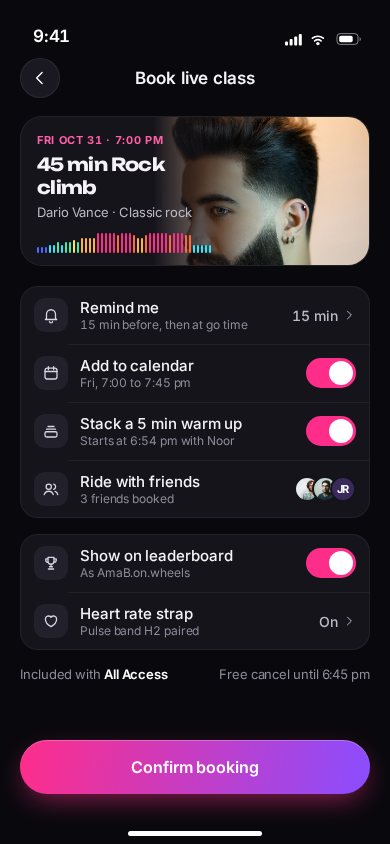
A checkout screen from Velo, a live and on-demand indoor cycling app template in a Dark-first style. Screen 9 of 25.
Velo is a complete indoor cycling app: welcome, goals and sign in, a home with your streak, the next live ride and your stack, a class library with filters, class details with the playlist and effort profile, the live schedule, booking and a confirmation, a countdown, the ride itself with three live metrics and a leaderboard, a summary with an output graph, instructors, programs, a stack, progress, achievements, membership, notifications, profile and settings. Stage black with hot magenta, cyan and amber.
| Detail | Value |
|---|---|
| Screen type | Checkout |
| App | Velo: Live and on-demand indoor cycling |
| Category | Health and fitness |
| Design language | Dark-first, dark |
| Type | Unbounded for headings, Inter for text |
| Colours | #09090d background, #15141b surface, #f5f3f8 text, #8e8b9b text-muted, #ff2d8a accent, #ffffff accent-contrast, #36e3ff secondary, #26242f border, #ffb23e warning |
What this screen says
- Book live class
- FRI OCT 31 · 7:00 PM
- 45 min Rock climb
- Dario Vance · Classic rock
- Remind me15 min before, then at go time
- 15 min
- Add to calendarFri, 7:00 to 7:45 pm
- Stack a 5 min warm upStarts at 6:54 pm with Noor
- Ride with friends3 friends booked
- JR
- Show on leaderboardAs AmaB.on.wheels
- Heart rate strapPulse band H2 paired
- On
- Included with All Access Free cancel until 6:45 pm
- Confirm booking
Around it in Velo
More booking and checkout screens
- Segment Group run: Runs and rides with friends
- Nightly Checkout: Smart ring sleep and readiness
- Pillbox Refill order: Pharmacy refills and medicine reminders
- Ward Schedule: Patient portal for results, visits and messages
- Level Refill: Glucose monitor companion
- Reformer Choose reformer: Pilates studio booking
- Sip Checkout: Water intake and hydration
- Mend Book a visit: Physio and rehab exercises
- Tabata Book class: HIIT interval timer
- Jab Book a 1:1: Boxing workouts with a smart bag
- Exhale Start trial: Breathwork sessions
- Bump Checkout: Pregnancy week by week
Every fitness app checkout screen
What makes a good checkout screen
- Show the total early and honestly. Taxes, delivery and service fees should appear before the last step. A higher total on the final screen feels like a trick.
- Offer wallet payments. Apple Pay and Google Pay skip card typing entirely. Show them first when they are available.
- Ask for the minimum. Only the fields needed to deliver or book. Save details for next time.
- Let people review before paying. A clear summary of items, dates, address and price, with each part editable without starting over.
The full checkout screen guide and every example
Remix Velo free: describe your own app and it is drawn in this design. Or get its files from $10: Figma, React Native, SwiftUI, Flutter and HTML.