Templates · Booking and checkout screens · Fitness app · Tabata
Tabata Book class screen
A checkout screen from Tabata, an HIIT interval timer app template in a Neubrutalism style. Screen 20 of 25.
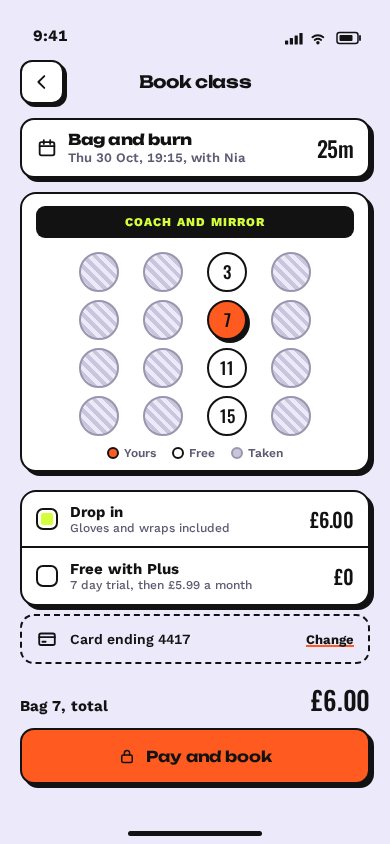
Tabata is a complete HIIT interval timer: welcome, a goal picker, sign in, a home with today's round strip and streak, a workout library with search, workout and exercise pages, a timer builder, a get ready count in, a live work phase and a rest phase, a finish screen and an effort log, history and a past session with heart rate, weekly stats, live coached classes with booking and a confirmation, a Plus plan, notifications, profile and settings. Lilac paper, black outlines, blaze orange work and acid lime rest.
| Detail | Value |
|---|---|
| Screen type | Checkout |
| App | Tabata: HIIT interval timer |
| Category | Health and fitness |
| Design language | Neubrutalism, light |
| Type | Unbounded for headings, Work Sans for text |
| Colours | #ece9fb background, #ffffff surface, #121212 text, #5e5a72 text-muted, #ff5a1f accent, #121212 accent-contrast, #d4ff3a secondary, #121212 border, #e8253f danger |
What this screen says
- Book class
- Bag and burn
- Thu 30 Oct, 19:15, with Nia
- 25m
- COACH AND MIRROR
- Yours Free Taken
- Drop inGloves and wraps included £6.00
- Free with Plus7 day trial, then £5.99 a month £0
- Card ending 4417 Change
- Bag 7, total £6.00
- Pay and book
Around it in Tabata
More booking and checkout screens
- Jab Book a 1:1: Boxing workouts with a smart bag
- Exhale Start trial: Breathwork sessions
- Bump Checkout: Pregnancy week by week
- Locker Pick a spot: Gym membership and class booking
- Medly Confirm visit: Doctor on call
- Donor Pick a slot: Blood donation, counted drop by drop
- Harbor Book session: Therapy and mood
- Vita Book a visit: Personal health record
- Flexpass Book: One membership, many studios
- Clinic Pick a time: Find and book doctors
- Careline Book visit: Care for an ageing parent
- Velo Book: Live and on-demand indoor cycling
Every fitness app checkout screen
What makes a good checkout screen
- Show the total early and honestly. Taxes, delivery and service fees should appear before the last step. A higher total on the final screen feels like a trick.
- Offer wallet payments. Apple Pay and Google Pay skip card typing entirely. Show them first when they are available.
- Ask for the minimum. Only the fields needed to deliver or book. Save details for next time.
- Let people review before paying. A clear summary of items, dates, address and price, with each part editable without starting over.
The full checkout screen guide and every example
Remix Tabata free: describe your own app and it is drawn in this design. Or get its files from $10: Figma, React Native, SwiftUI, Flutter and HTML.